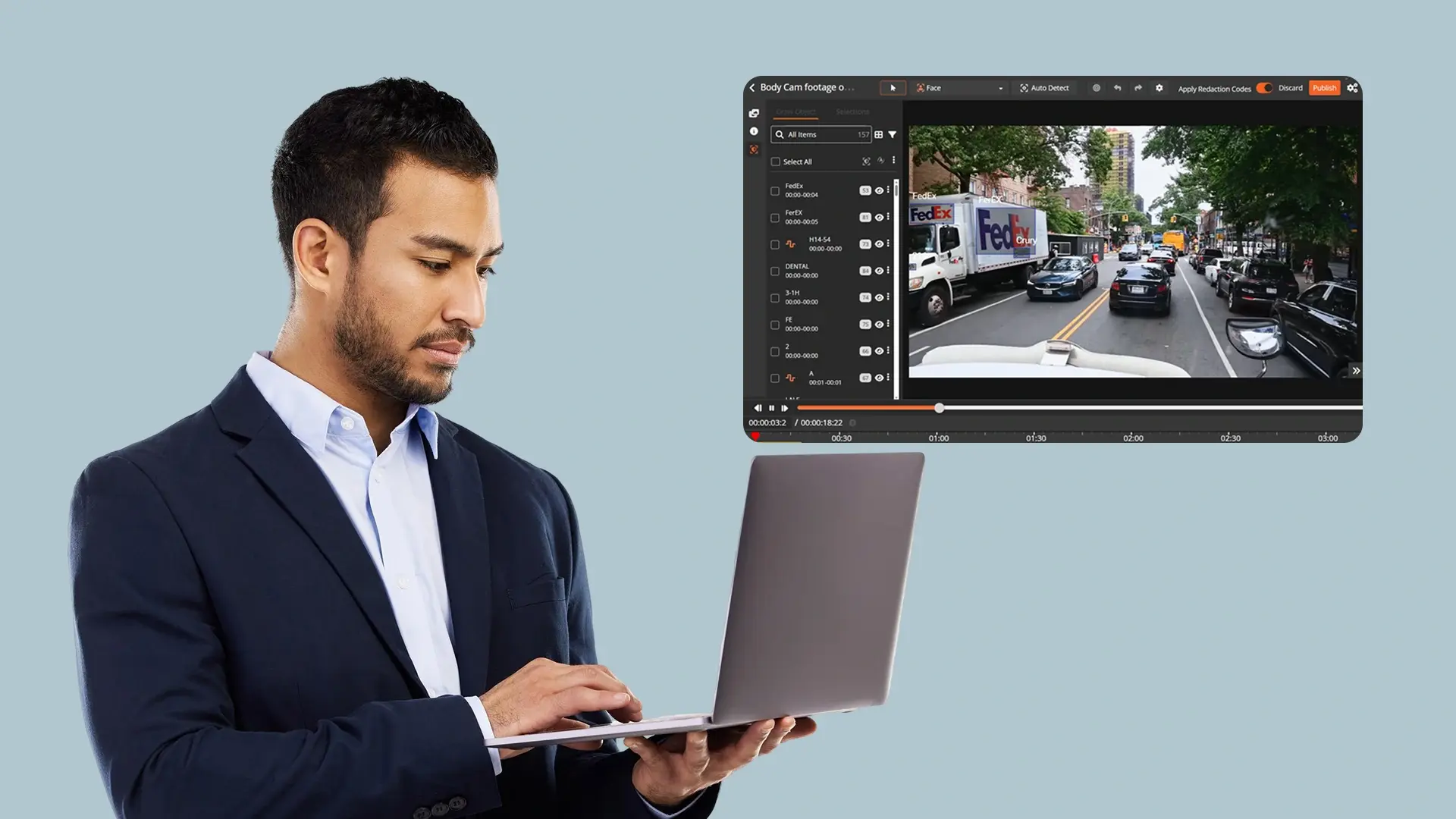
Legal teams redacting medical records, case files, and court documents by hand are playing a losing game. One missed Social Security number or an unredacted date of birth in a patient record is not just a workflow failure. It is a HIPAA violation with real consequences.
AI redaction software automates the detection and removal of sensitive information so legal professionals can process high volumes without the risk. Here is a practical comparison of five tools for legal teams evaluating their options.
What Legal Teams Need From AI Redaction Software
Not every redaction tool is built for legal work. Before comparing products, these four criteria matter most:
AI auto-detection of PII and PHI
The tool should find Social Security numbers, dates of birth, addresses, and protected health information automatically, not wait for you to highlight each one manually.
Bulk processing
Legal teams handling mass tort cases, VA claims, or eDiscovery productions need to process hundreds or thousands of files at once, including scanned documents that require OCR.
Compliance coverage
HIPAA, FOIA exemption codes, full audit trails, and chain of custody documentation are non-negotiable for legally defensible redaction. For a closer look at what this means in practice, see redaction software used in legal and compliance workflows.
Deployment flexibility
Some firms can work in the cloud. Others, especially those handling government contracts or classified material, need on-premises or private cloud options to meet data residency requirements.
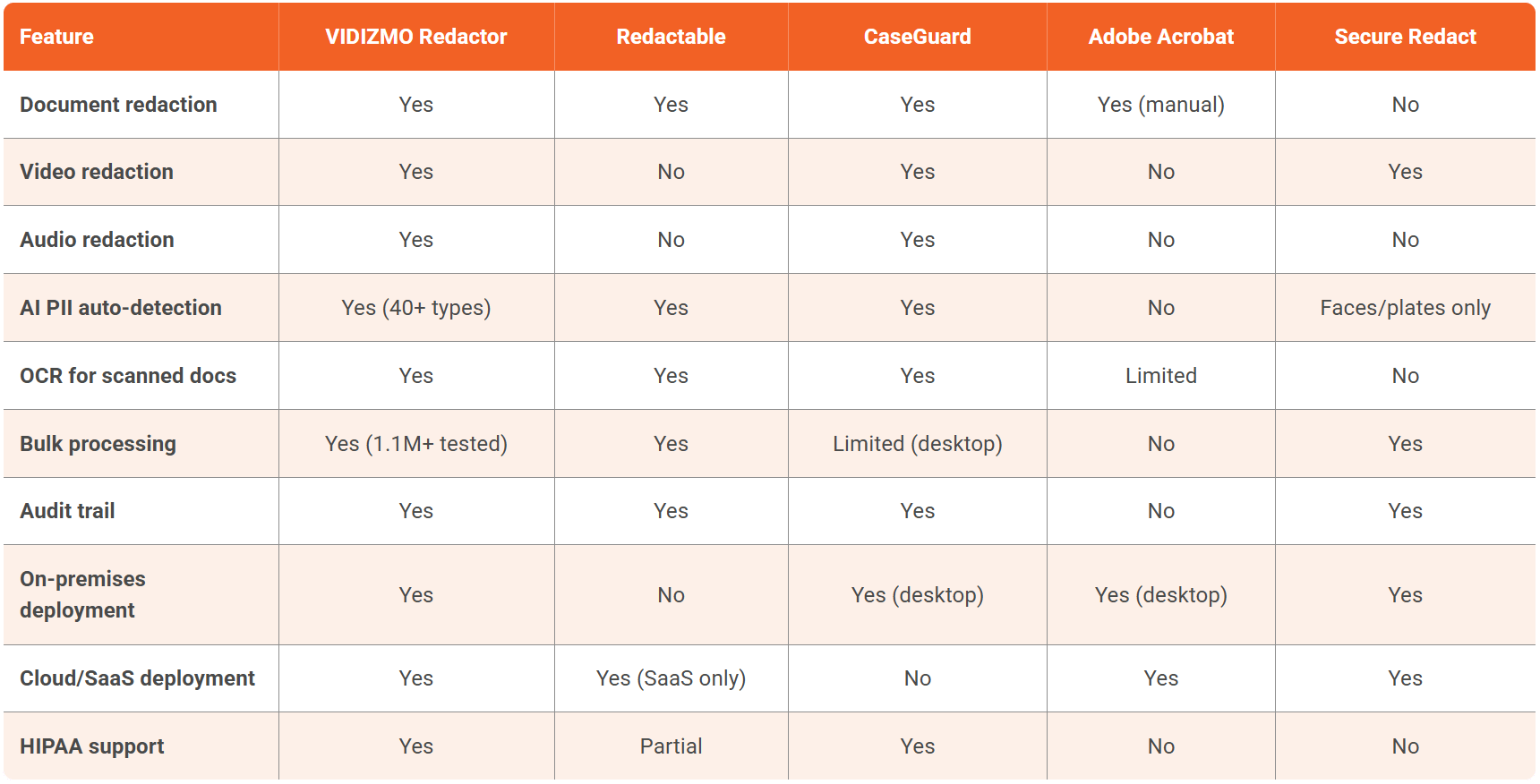
Comparing the Top AI Redaction Software for Legal Work
1. VIDIZMO Redactor
VIDIZMO Redactor is an AI-powered redaction platform that handles documents, PDFs, video, audio, and images in a single interface across 255+ file formats.
Strengths
Auto-detects 40+ PII types including PHI and PCI data with country-specific patterns for the US, UK, Canada, India, and the EU. Supports OCR for scanned documents and ICR for handwritten text. Bulk processing is tested at over two million recordings. Full audit trails document every redaction decision with who, what, and when. Deployment options include SaaS, government cloud, on-premises, and hybrid.
Weaknesses
Built for multi-format workflows, so document-only teams will use a fraction of what it offers. Pricing is consumption-based (per processing unit), which requires estimating volume upfront.
Best for
Legal teams processing high volumes of mixed-format files who need HIPAA compliance, full audit trails, and flexible deployment.
Start a VIDIZMO Redactor Free Trial today! No Credit Card Required

2. Redactable
Redactable is a SaaS document redaction platform built specifically for PDFs and text-based files.
Strengths
Clean, intuitive interface designed for document-centric workflows. AI-powered PII detection with permanent, irreversible redaction. API integration for connecting to existing document management systems. Quick onboarding for teams new to dedicated redaction tools.
Weaknesses
Documents only. No video, audio, or image redaction. SaaS-only with no on-premises deployment option. No CJIS or FedRAMP compliance, which limits use for government-adjacent legal work.
Best for
Legal teams that only redact PDFs and text documents and are comfortable with a cloud-only platform.
3. CaseGuard
CaseGuard is a desktop redaction application that handles video, audio, images, and documents across 750+ file types.
Strengths
Broad format support in a single desktop app. Flat-rate pricing ($99 to $249 per month) with unlimited redactions, which simplifies budgeting. 100+ language transcription and translation. Strong presence in law enforcement with 1,000+ agency customers.
Weaknesses
Desktop-only architecture limits scalability for large teams or remote workflows. No cloud or SaaS deployment. The VA Technology Risk Management program has flagged it for lacking FIPS validation, which matters for federal-adjacent legal work.
Best for
Small legal teams or firms doing multimedia redaction on local machines where on-premises control is the priority.
4. Adobe Acrobat
Adobe Acrobat is not a dedicated redaction tool, but it is the default PDF editor in most legal environments and includes basic redaction features.
Strengths
Already installed in nearly every law firm and government office. Familiar interface. Adequate for occasional, single-document redaction of text-based PDFs.
Weaknesses
Manual, one-file-at-a-time process with no AI auto-detection. No video or audio capability. No audit trail, no exemption codes, and no chain of custody documentation. Not legally defensible for compliance-driven redaction at scale.
Best for
Occasional redaction of individual PDF documents where speed and compliance are not critical.
5. Secure Redact
Secure Redact (formerly Pimloc) is a UK-based platform focused on video and image redaction using AI to detect faces, people, and license plates.
Strengths
Purpose-built for video privacy with strong face and person detection. Offers SaaS, private cloud, and on-premises deployment options. Well-suited for organizations with video-heavy redaction needs.
Weaknesses
Video and image only. No document, PDF, or audio redaction. No US government certifications (CJIS, FedRAMP). Limited presence in the US legal market.
Best for
Teams whose redaction workload is primarily video and who do not need document or audio processing.
How to Pick the Right AI Redaction Tool for Legal Work
Occasional single-document redaction
If your team redacts a handful of PDFs per week and compliance requirements are minimal, Adobe Acrobat or Redactable will get the job done without added complexity.
Small firm handling mixed media on local machines
If your firm handles video depositions or body camera footage alongside documents and needs everything processed locally, CaseGuard covers the format range at a predictable monthly cost. Solo attorneys and small teams managing HIPAA-covered files should also review what HIPAA-compliant document redaction looks like without IT involvement.
High-volume document redaction at scale
If your team processes medical records, mass tort files, or VA claims and needs defensible compliance documentation, VIDIZMO Redactor provides the automation, format coverage, and deployment flexibility to match. For teams managing eDiscovery or large-scale discovery productions, bulk document redaction for law firms covers how automated workflows handle that volume. If you also need guidance on what must be redacted before filing, how to redact legal documents walks through requirements by document type.
Cut Redaction Time With VIDIZMO Redactor
Legal teams using VIDIZMO Redactor process documents, medical records, and multimedia evidence in a fraction of the time manual redaction takes. AI auto-detection, bulk processing, and full audit trails handle the compliance burden so your team can focus on the case.
Start a free trial and run it on your own files. Request a demo if you want a guided walkthrough for your specific workflow.
FAQ
Frequently Asked Questions
What is AI redaction software and how does it work for legal teams?
AI redaction software uses machine learning and natural language processing to automatically detect and permanently remove sensitive information from documents, audio, video, and images. For legal teams, this means the software scans files for PII, PHI, and privileged content, applies redactions, and logs every decision in an audit trail without requiring manual review of each page or frame.
Is AI redaction software HIPAA-compliant?
It depends on the tool. Platforms like VIDIZMO Redactor support HIPAA compliance through AES-256 encryption, role-based access controls, full audit logging, and Business Associate Agreement (BAA) availability. Adobe Acrobat does not support HIPAA-compliant redaction workflows. Always confirm BAA availability before uploading any PHI to a third-party redaction tool.
Can AI redaction software process scanned documents and handwritten records?
Yes, provided the platform includes OCR (Optical Character Recognition) for scanned files and ICR (Intelligent Character Recognition) for handwritten text. Without OCR, a scanned PDF is treated as an image and text-based PII detection cannot run on it. VIDIZMO Redactor supports both OCR and ICR, which matters for legal teams processing older paper records, medical files, and handwritten case notes.
What is the difference between redaction and simply highlighting text black in a PDF?
Visual masking, such as drawing a black box over text, does not constitute true redaction. The underlying data remains in the document and can be extracted by copying the text or inspecting the file's metadata. Legally defensible redaction permanently removes both the visible content and the underlying data. Purpose-built redaction tools also scrub metadata to prevent recovery.
Do legal teams need on-premises redaction software or is cloud sufficient?
It depends on the firm's data residency requirements. Solo attorneys and small firms handling standard civil matters can typically use a cloud-based platform without issue. Firms with government contracts, CJIS-regulated data, or classified material may require on-premises or private cloud deployment. VIDIZMO Redactor supports SaaS, government cloud, on-premises, and hybrid deployment across the same platform.
How does bulk redaction work for high-volume legal workflows like mass tort or eDiscovery?
Bulk redaction allows legal teams to upload hundreds or thousands of files at once and process them through automated redaction queues, including overnight runs without staff supervision. The system applies predefined rules for PII and PHI detection across the entire batch, flags items for human review where needed, and logs every redaction for audit purposes. VIDIZMO Redactor's bulk processing has been tested at over 1.1 million recordings.
What makes a redaction legally defensible in court or during a compliance audit?
Defensible redaction requires a full audit trail that logs the user identity, timestamp, rule applied, and content removed for every redaction decision. For FOIA responses, statutory exemption codes must be tied to each withheld item. For HIPAA-covered documents, the redaction platform must operate under a signed BAA. Platforms that only visually mask content without logging or metadata removal do not meet this standard.
TopicsRedactionDocument RedactionFOIA Redaction

About the author
Ali Rind is a Product Marketing Executive at VIDIZMO, where he focuses on digital evidence management, AI redaction, and enterprise video technology. He closely follows how law enforcement agencies, public safety organizations, and government bodies manage and act on video evidence, translating those insights into clear, practical content. Ali writes across Digital Evidence Management System, Redactor, and Intelligence Hub products, covering everything from compliance challenges to real-world deployment across federal, state, and commercial markets.
You may also like

Video Redaction Best Practices: Motion, Frame Rates, Tracking and Failing Safe
I led our video redaction project for a county public safety agency where two people handled every disclosure, and ...

Redacting Dash Cam, Body Cam and Drone Footage From a Moving Camera
A fleet claims manager preparing crash footage for an insurer and defense counsel is doing a different job from a ...

Why Frame-Rate Headers Lie: Redacting Variable Frame Rate Video
A video file keeps time frame by frame, and the frames-per-second figure a player displays is a summary of that timing, ...