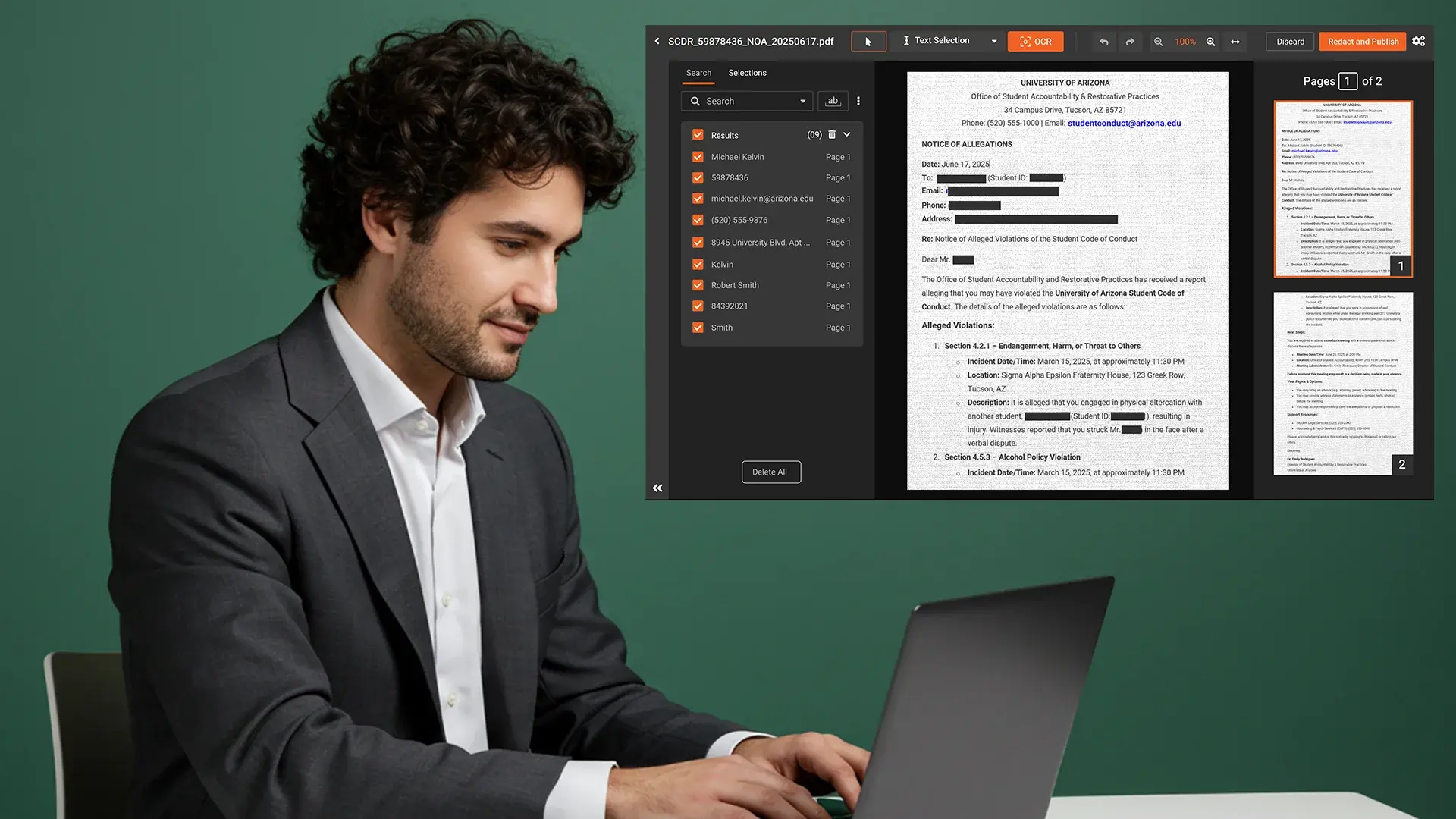
Organizations across healthcare, insurance, finance, legal, law enforcement, and the public sector handle large volumes of scanned and handwritten documents every day. These include medical records, insurance claims, contracts, investigation files, and public records.
Many of these documents contain PII or PHI that must be removed before sharing, storing, or publishing. The challenge is significant.
Scanned and handwritten documents are often image-based and do not contain selectable text.
Traditional redaction tools cannot reliably detect sensitive information within them.
This is where OCR redaction software plays a critical role by enabling organizations to automatically identify and remove sensitive data from both scanned and handwritten documents.
Start Your Free Trial Today - No Credit Card Needed

Why Scanned and Handwritten Documents Are Difficult to Redact
Scanned PDFs and handwritten forms are essentially images of text. They often include:
- Handwritten notes and annotations
- Low-quality or aged scans
- Complex layouts and form fields
- Mixed visual content, such as stamps and IDs
Without OCR-based automation, redaction requires manual review, which increases risk, cost, and processing time.
To redact these documents accurately, a solution must be able to:
- Read printed and handwritten text using OCR
- Identify sensitive information such as names, addresses, IDs, or medical data
- Apply permanent redaction that fully removes the data
What Is OCR Redaction for Scanned and Handwritten Documents
OCR, or Optical Character Recognition Software, converts scanned and handwritten content into machine-readable text. When paired with AI-driven redaction, OCR enables organizations to:
- Extract text from scanned and handwritten documents
- Detect PII and PHI using keywords and data patterns
- Redact sensitive information automatically and permanently
- Search files using the text contained within them
VIDIZMO Redactor uses OCR not only to redact sensitive text, but also to help users locate redactable content and quickly find files through OCR-based search.
Redact Scanned and Handwritten Documents with Confidence
Manually redacting scanned and handwritten documents is time-consuming and error-prone.
VIDIZMO Redactor uses advanced OCR to extract text from both scanned documents and handwritten notes, ensuring sensitive information is identified even when text quality varies. Users can redact information based on keywords or common data patterns such as names, phone numbers, addresses, credit card numbers, medical record numbers, and insurance identifiers.
This approach helps organizations maintain accuracy while reducing manual effort.
Redact Multiple Documents at Once
Organizations often need to redact hundreds or thousands of documents at a time.
VIDIZMO Redactor supports bulk redaction, allowing multiple scanned and handwritten documents to be uploaded and processed simultaneously. This significantly reduces turnaround time and ensures consistent redaction across large document sets.
Find and Redact Text Inside Images and Media Files
Sensitive text often appears beyond traditional documents.
VIDIZMO Redactor uses OCR to detect text inside images and videos, such as:
- IDs and badges
- Signs and labels
- Documents captured within images or video footage
This ensures sensitive information embedded in visual media is not overlooked.
How OCR Redaction Works in VIDIZMO Redactor
The OCR redaction workflow is secure and efficient.
Step 1: Upload Documents
Upload scanned PDFs, images, and handwritten document files individually or in bulk.
Step 2: Extract Text with OCR
Advanced OCR detects printed and handwritten text, even in low-quality documents.
Step 3: Identify PII and PHI
Sensitive data such as names, addresses, phone numbers, medical record numbers, and financial identifiers are automatically detected.
Step:4 Apply Permanent Redaction
Redaction is applied securely so sensitive information cannot be recovered.
Step 5 Export with Audit Logs
Redacted files are exported with complete audit trails for compliance and accountability.
A Redaction Solution Designed for Regulated Industries
VIDIZMO Redactor is built to support organizations that handle sensitive information and must comply with strict privacy, security, and disclosure regulations. Its OCR-powered redaction capabilities help teams securely process scanned and handwritten documents at scale while reducing manual effort and risk.
Healthcare
Healthcare organizations manage vast amounts of patient information in both digital and paper-based formats. Scanned medical records, lab reports, consent forms, and intake documents often contain PHI that must be protected under HIPAA.
VIDIZMO Redactor enables healthcare providers to automatically detect and redact PHI such as patient names, dates of birth, medical record numbers, insurance IDs, and physician details from scanned and handwritten documents. This helps hospitals, clinics, and healthcare administrators safely share records for audits, research, billing, or legal requests without exposing sensitive patient data.
Insurance
Insurance companies rely heavily on scanned documents throughout the claims and underwriting lifecycle. Claims forms, supporting medical documents, accident reports, and identification records frequently contain PII that must be removed before documents are shared internally or externally.
VIDIZMO Redactor allows insurance teams to redact sensitive information such as names, addresses, policy numbers, financial details, and medical identifiers from scanned claim files. Bulk redaction capabilities help insurers process large volumes of documents quickly, improving turnaround times while maintaining compliance with data protection regulations.
Legal and Public Sector
Legal organizations and public sector agencies regularly handle scanned case files, court records, contracts, and public disclosure documents. These files often include sensitive personal, financial, or confidential information that must be redacted before publication or release.
VIDIZMO Redactor helps legal teams and government agencies securely redact PII from scanned court documents, legal filings, FOIA responses, and public records. OCR-based detection ensures sensitive data is identified even in non-searchable documents, supporting transparency requirements while protecting individual privacy.
Law Enforcement
Law enforcement agencies process a wide range of sensitive evidence and documentation, including scanned reports, witness statements, investigation files, and case images. These materials often contain PII related to victims, witnesses, informants, and officers.
VIDIZMO Redactor enables law enforcement teams to redact sensitive identities and information from scanned documents and related media while maintaining evidentiary integrity. The platform supports compliance with CJIS and other regulatory standards, helping agencies safely share records with courts, legal teams, or the public without compromising investigations or individual safety.
Why Organizations Choose VIDIZMO Redactor
- Advanced OCR for scanned and handwritten documents
- Keyword-based and pattern-based redaction
- Bulk redaction for high-volume workflows
- OCR-based search across all media types
- Support for documents, images, videos, and audio
- Secure cloud, on-premises, and hybrid deployment options
- Full audit trails for compliance verification
Manually redacting scanned and handwritten documents is no longer sustainable for organizations managing sensitive information at scale. As compliance demands increase and document volumes grow, OCR-based automation becomes essential.
VIDIZMO Redactor provides a reliable solution for automatically redacting PII and PHI from scanned and handwritten documents. By combining advanced OCR, bulk processing, and powerful search capabilities, organizations can protect sensitive data without slowing down operations.
Start Your Free Trial Today - No Credit Card Needed
FAQ
Frequently Asked Questions
Can OCR redaction software accurately detect handwritten text, not just printed text?
Yes, VIDIZMO Redactor uses advanced OCR that detects both printed and handwritten text, even in low-quality or aged scans. It identifies sensitive data like names, dates, and medical record numbers from handwritten notes and annotated forms. This makes it reliable for real-world documents that mix typed and handwritten content.
What types of sensitive data can be automatically redacted from scanned documents?
VIDIZMO Redactor automatically detects and redacts PII and PHI including names, addresses, phone numbers, dates of birth, medical record numbers, insurance IDs, policy numbers, and financial identifiers. Detection works through both keyword search and pattern-based recognition, reducing reliance on manual review.
Is VIDIZMO Redactor suitable for bulk redaction of scanned document sets?
Yes. The platform supports bulk upload and simultaneous processing of large document volumes. This is particularly useful for healthcare providers, insurers, law enforcement agencies, and legal teams that regularly handle hundreds or thousands of scanned files at a time.
Can VIDIZMO Redactor find and redact sensitive text embedded in images and videos?
Yes. Beyond standard documents, VIDIZMO Redactor uses OCR to detect sensitive text appearing inside images and video frames, including ID cards, badges, signs, and documents captured within footage. This prevents PII from slipping through in visual media that traditional tools would miss.
Does VIDIZMO Redactor support compliance requirements for regulated industries like healthcare and law enforcement?
Yes. The platform is built for regulated environments. It supports HIPAA compliance for healthcare, CJIS standards for law enforcement, and data protection requirements for legal and public sector use cases. Redacted files are exported with full audit trails for compliance verification and accountability.
TopicsRedaction
About the author
Zain Noor is a Product Marketing Executive at VIDIZMO with expertise in AI redaction technology. He focuses on how public safety agencies, government bodies, and commercial organizations adopt and operationalize video intelligence at scale.
You may also like

Video Redaction Best Practices: Motion, Frame Rates, Tracking and Failing Safe
I led our video redaction project for a county public safety agency where two people handled every disclosure, and ...

Redacting Dash Cam, Body Cam and Drone Footage From a Moving Camera
A fleet claims manager preparing crash footage for an insurer and defense counsel is doing a different job from a ...

Why Frame-Rate Headers Lie: Redacting Variable Frame Rate Video
A video file keeps time frame by frame, and the frames-per-second figure a player displays is a summary of that timing, ...