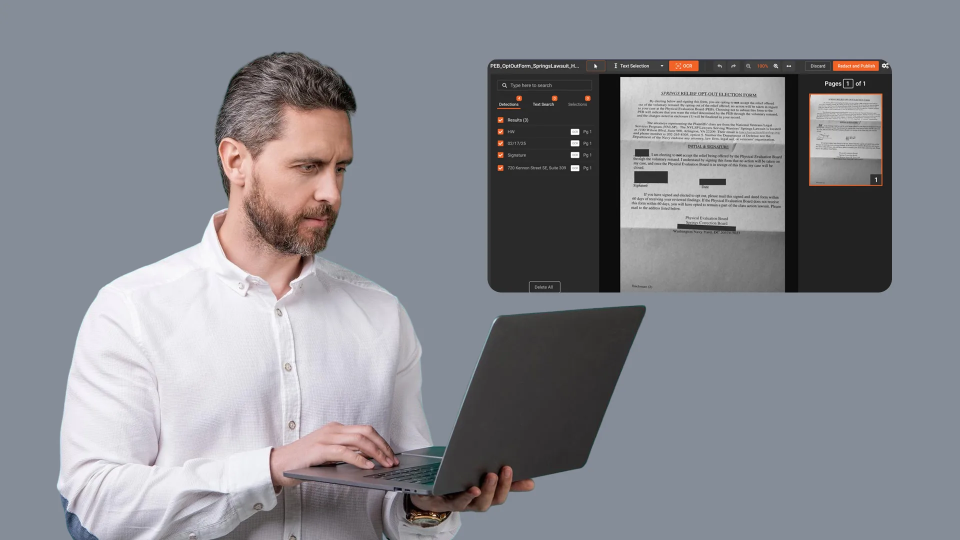
A PDF redaction tool is software that permanently removes sensitive information from PDF documents before they are shared, published, or released to the public. Government agencies, legal teams, healthcare organizations, and financial institutions rely on these tools to strip out Social Security numbers, medical records, financial data, and other personally identifiable information (PII) that regulations require them to protect. If your organization handles document redaction at any meaningful volume, a dedicated PDF redaction tool is not optional. It is a core part of your compliance workflow.
The stakes keep rising. According to the HIPAA Journal's analysis of HHS breach portal data, healthcare breaches exposed over 385 million patient records between 2010 and 2022. Many of those breaches traced back to improperly redacted documents. Citigroup's failed redaction in bankruptcy filings exposed the personal data of nearly 150,000 consumers across 85 jurisdictions, after Social Security numbers and birthdates were not properly redacted as required by bankruptcy rules. These are not hypothetical scenarios. They are what happens when organizations rely on manual processes or tools that were not built for the job.
This guide covers what a strong PDF redaction tool should do, why basic redaction methods fail, and how to evaluate options for high-volume, compliance-driven environments.
Key Takeaways
- A PDF redaction tool must permanently remove data, not just cover it visually. "Black box" overlays in standard PDF editors can be reversed.
- OCR-based redaction is essential for scanned PDFs, which make up a large portion of government and legal document workflows.
- AI-powered PII detection catches patterns (SSNs, account numbers, dates of birth) that keyword search alone misses.
- Audit trails and exemption codes turn redaction from a task into a defensible compliance process.
- Batch processing separates tools built for single documents from those designed for enterprise-scale redaction.
What Is a PDF Redaction Tool and Why Does It Matter?
A PDF redaction tool is purpose-built software that identifies and permanently removes sensitive content from PDF files. Unlike highlighting or drawing black boxes over text in a standard editor, proper redaction eliminates the underlying data. That means the content cannot be recovered by copying, searching, or inspecting the file's metadata layer.
This distinction matters more than most people realize. The U.S. Courts (PACER) system has documented multiple cases where attorneys filed "redacted" PDFs that still contained extractable text beneath visual overlays. The Paul Manafort case is the most widely cited example: sensitive financial details were fully readable by simply copying the "redacted" text.
True redaction removes the text, images, and metadata permanently. The original content cannot be reconstructed. Any tool that does not do this is not performing redaction. It is applying a cosmetic layer that creates legal liability.
Why Do Standard PDF Editors Fall Short for Redaction?
Most PDF editors (Adobe Acrobat, Foxit, Nitro) include annotation features that look like redaction but don't function as redaction. They overlay shapes on content without deleting the underlying data. Some offer true redaction as a premium feature, but they still fall short for organizations processing documents at scale.
Here's where generic editors break down:
- No automated PII detection. An analyst must manually find every instance of a Social Security number, date of birth, or account number. In a 200-page document, that's hours of work and a near-guarantee that something gets missed.
- No OCR for scanned files. Scanned PDFs contain images, not searchable text. Without optical character recognition (OCR), the tool can't identify text-based PII in scanned pages, handwritten forms, or photographed documents.
- No batch processing. Processing one file at a time doesn't work when an agency receives 50 FOIA requests per week, each involving dozens of documents.
- No audit trail. Standard editors don't log what was redacted, when, by whom, or under what legal authority. That makes every redaction indefensible if challenged.
For a single document with a few sensitive fields, a standard PDF editor works fine. For anything beyond that, you need a tool built specifically for redaction compliance.
What Features Should a PDF Redaction Tool Include?
A capable PDF redaction tool goes well beyond find-and-replace. The features below separate compliance-grade tools from basic editors.
AI-Powered PII Detection
Pattern-based detection identifies structured data like Social Security numbers (XXX-XX-XXXX), credit card numbers, and phone numbers automatically. Contextual AI takes this further, using natural language processing to recognize names, addresses, and other PII that doesn't follow a fixed format. The strongest tools detect 40 or more PII types without requiring the analyst to define every pattern manually.
OCR for Scanned Documents
Government agencies and law firms frequently deal with scanned documents, faxed forms, and photographed records. OCR converts these images into machine-readable text so the tool can identify and redact PII within them. Advanced OCR also handles handwritten text (Intelligent Character Recognition, or ICR) and non-Latin scripts.
Batch and Bulk Processing
High-volume environments need to process hundreds or thousands of PDFs in a single operation. Queue-based batch processing lets teams submit large jobs, configure redaction rules, and let the system run unattended. This is the gap between a tool for individuals and a platform for organizations.
Exemption Codes and Audit Trails
In FOIA and public records contexts, every redaction must be linked to a legal exemption (e.g., FOIA Exemptions 1 through 9, or state-specific codes). A strong tool lets analysts tag each redaction with the applicable exemption code and generates an audit log recording every action, timestamp, and user involved. Our guide on FOIA redaction software covers the exemption framework in detail.
Multi-Format Support
PDFs don't exist in isolation. The same public records request often includes Word documents, spreadsheets, images, and sometimes audio or video files. A tool that handles only PDFs forces organizations to maintain separate workflows for each format. The most efficient approach covers all document types in one platform.
How Does OCR Change PDF Redaction for Scanned Files?
Without OCR, a scanned PDF is just a collection of images. The redaction tool has no text layer to search, so it can't find PII automatically. The analyst is left drawing black boxes over every sensitive field on every page. Slow. Inconsistent. Error-prone.
OCR transforms scanned content into searchable text, enabling the same automated PII detection that works on native (digitally created) PDFs. Good OCR handles:
- Printed text in multiple fonts and sizes
- Handwritten text via ICR, common in intake forms and medical records
- Non-Latin scripts such as Arabic, Urdu, and Farsi for organizations with multilingual document sets
- Low-quality scans from older fax machines, photocopiers, or mobile device cameras
To put the scale in perspective: the UK's Department for Work and Pensions (DWP) processes approximately 4 million pages per year through a single redaction deployment. That workload would be impossible without automated OCR and PII detection working in tandem. It also illustrates what becomes possible when OCR is tightly integrated into the redaction pipeline rather than treated as a separate preprocessing step.
PDF Redaction Across Regulated Industries
Different industries face different compliance drivers, but the core requirement is the same: remove sensitive data before documents leave the organization.
.jpg?width=800&height=369&name=image%20(15).jpg)
Every one of these industries also requires audit trails and documentation of the legal basis for each redaction. A tool that blacks out text without logging the action or the exemption code will not satisfy auditors or courts. For government-specific requirements, see our guide on document redaction for government.
How VIDIZMO Redactor Handles PDF Redaction at Scale
VIDIZMO Redactor approaches PDF redaction as one component of a broader, multi-format redaction platform. Instead of treating PDFs as a separate workflow, the platform applies the same AI detection, OCR, and compliance features across PDFs, Word documents, spreadsheets, images, video, and audio files, covering 255+ formats total.
For PDF-specific workflows, Redactor provides:
- 40+ PII types detected automatically, including SSNs, credit card numbers, dates of birth, addresses, passport numbers, and country-specific identifiers (UK National Insurance numbers, Indian Aadhaar numbers, Canadian Social Insurance Numbers)
- Object detection inside PDFs, identifying and redacting faces, license plates, and vehicles embedded as images within PDF pages. Text-only tools miss these entirely.
- Perso-Arabic OCR covering Arabic, Urdu, Sindhi, Dari, and Pashto scripts for organizations with multilingual document archives
- Bates stamping for legal numbering and exemption code annotation on every redacted page
- Batch processing tested with over two million recordings, with queue-based automation for unattended overnight runs
Redactor supports SaaS, government cloud, on-premises, private cloud, and hybrid deployments. That matters for agencies with strict data residency requirements or air-gapped environments where documents can't be sent to external cloud services.
If your team is processing PDFs under FOIA, HIPAA, or any regulatory deadline, the cost of getting redaction wrong is measured in exposed data and legal liability. Contact us to discuss your compliance requirements with our team.

Five Steps to Evaluate a PDF Redaction Tool
If you're comparing tools, these five criteria separate serious platforms from basic editors wearing a compliance label.
- Test with scanned PDFs. Upload a scanned, multi-page document and see if the tool detects PII without manual intervention. If it can't handle scanned content, it won't handle your real-world workload.
- Check the PII detection breadth. Ask how many PII types the tool recognizes out of the box. Pattern matching alone (regex) misses context-dependent PII like names and addresses. Look for NLP or AI-based contextual detection.
- Run a batch test. Upload 50 or more documents and evaluate how the tool handles queue management, progress tracking, and error handling. Single-file tools won't scale.
- Review the audit trail. After redacting a document, export the audit log. It should show every redaction, the user who applied it, the timestamp, and the exemption code. If the log is vague or missing, the tool won't hold up under legal scrutiny.
- Confirm permanent removal. Open the redacted PDF in a text editor or use a PDF inspection tool. If the original text is still present beneath the visual overlay, the "redaction" is cosmetic and creates more risk than it resolves.
Common Mistakes That Undermine PDF Redaction
Even with the right tool, certain practices introduce risk:
- Relying on visual-only redaction. Overlaying black boxes without removing the underlying text data. This is the most common and most dangerous mistake.
- Ignoring metadata. PDF files contain metadata (author names, revision history, comments, hidden layers) that may include sensitive information. A complete redaction process strips metadata along with visible content.
- Skipping OCR on mixed documents. A single PDF might contain both native text pages and scanned image pages. If OCR only runs on detected image pages, it may miss embedded images within native text pages.
- No version control. Editing the original file instead of creating a redacted copy means the unredacted version is gone permanently. Best practice: generate a separate redacted output file while preserving the original under access controls.
- Inconsistent exemption codes. Different analysts applying different exemption codes to the same type of PII across documents. Standardized redaction templates and policies prevent this.
Choosing the Right Tool for Your Redaction Workload
The right PDF redaction tool depends on your volume, your compliance requirements, and the formats you need to cover. For teams processing a handful of documents per month, a standard PDF editor with true redaction capability may suffice. For agencies and enterprises handling hundreds or thousands of documents under regulatory deadlines, you need automated PII detection, OCR, batch processing, and defensible audit trails.
If your redaction needs extend beyond PDFs to include video, audio, or images, a platform that covers all formats in one workflow will save you from stitching together separate tools. That consolidation reduces training time, eliminates format-specific gaps, and creates a single audit trail across all media types.
FAQ
Frequently Asked Questions
What is a PDF redaction tool?
A PDF redaction tool is software that permanently removes sensitive information from PDF documents so the data cannot be recovered, copied, or searched. Unlike annotation or highlighting, true redaction eliminates the underlying text and image data from the file. Organizations use these tools to comply with regulations like FOIA, HIPAA, GDPR, and PCI-DSS before sharing documents publicly or with third parties.
Can you redact scanned PDFs automatically?
Yes, if the redaction tool includes OCR (optical character recognition). OCR converts scanned images into machine-readable text, enabling automated PII detection on documents that were originally paper-based. Without OCR, scanned PDFs require fully manual redaction, which is significantly slower and more error-prone.
How does a PDF redaction tool differ from a standard PDF editor?
A standard PDF editor (Adobe Acrobat, Foxit) can place visual overlays on content, but the underlying data often remains extractable. A dedicated redaction tool permanently removes the text, images, and metadata. It also provides automated PII detection, batch processing, audit trails, and exemption code tagging that standard editors lack. For compliance-driven workflows, only a purpose-built tool meets the legal standard for defensible redaction.
What types of PII can a PDF redaction tool detect?
Most dedicated tools detect common structured PII like Social Security numbers, credit card numbers, phone numbers, and dates of birth using pattern matching. Advanced tools add AI-based contextual detection for names, addresses, and other unstructured PII.
How does PDF redaction support FOIA compliance?
FOIA requires government agencies to release records upon request while protecting information that falls under specific legal exemptions (Exemptions 1 through 9). A PDF redaction tool lets FOIA analysts tag each redaction with the applicable exemption code, creating a documented, defensible record of why each piece of information was withheld. Audit trails capture who performed the redaction and when, which is critical if the redaction decision is challenged.
Can a PDF redaction tool handle images embedded in PDFs?
Most text-based redaction tools cannot detect PII in images embedded within PDF pages, such as photographs, scanned inserts, or screenshots. Tools with visual AI detection can identify faces, license plates, and other objects inside PDF-embedded images.
TopicsRedactionDocument Redaction

About the author
Ali Rind is a Product Marketing Executive at VIDIZMO, where he focuses on digital evidence management, AI redaction, and enterprise video technology. He closely follows how law enforcement agencies, public safety organizations, and government bodies manage and act on video evidence, translating those insights into clear, practical content. Ali writes across Digital Evidence Management System, Redactor, and Intelligence Hub products, covering everything from compliance challenges to real-world deployment across federal, state, and commercial markets.
You may also like

Video Redaction Best Practices: Motion, Frame Rates, Tracking and Failing Safe
I led our video redaction project for a county public safety agency where two people handled every disclosure, and ...

Redacting Dash Cam, Body Cam and Drone Footage From a Moving Camera
A fleet claims manager preparing crash footage for an insurer and defense counsel is doing a different job from a ...

Why Frame-Rate Headers Lie: Redacting Variable Frame Rate Video
A video file keeps time frame by frame, and the frames-per-second figure a player displays is a summary of that timing, ...