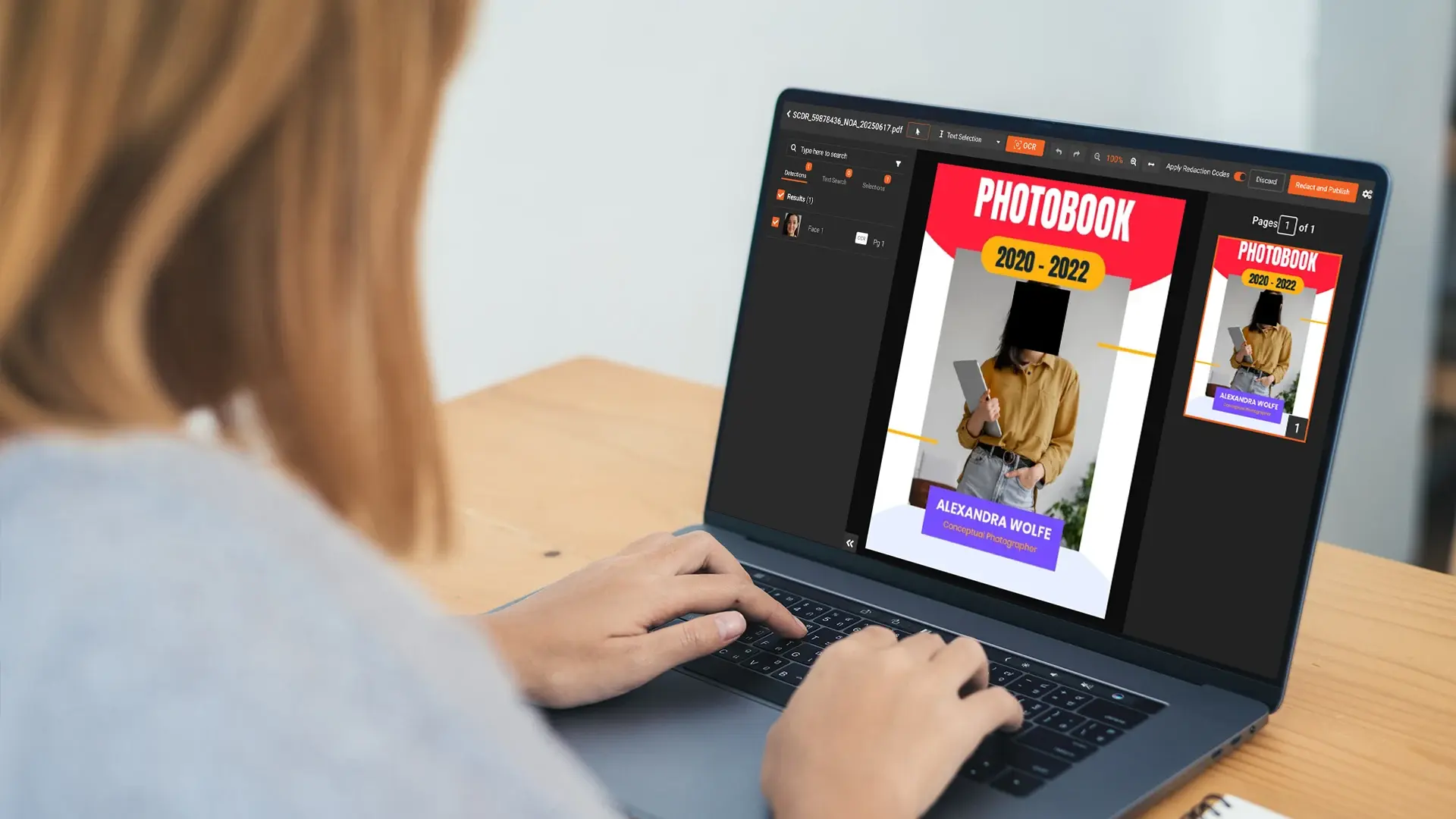
Most PDF redaction is text redaction. You scan the document, find the names, the account numbers, the email addresses, and drop a black box over each one. The reviewer signs off, the file gets sent. Done.
Except for the photo on page 217.
Embedded images are the part of PDF redaction that almost nobody handles properly. A respondent headshot in a 400 page research deck. A screenshot of a Slack thread pasted into a legal exhibit. A scanned ID card sitting inside a claims file. The text around the image is clean. The image is not, and the tool you used to clean the text never looked at it.
This is not Adobe's fault, exactly. Adobe Acrobat does what it was built to do: it lets a human draw boxes on a page. It does not detect faces, it does not scan embedded images for objects, and unless you flatten and re-export carefully, the original picture is often still recoverable from the file structure. Same story for Redactable and Objective Redact. They are document tools. The visual layer is somebody else's problem.
So whose problem is it? Yours, usually, by the time you find out.
Why text-based PDF redaction stops at the image boundary
A PDF is not really one thing. It is a container that holds text objects, vector graphics, raster images, scanned page images, form fields, and a pile of metadata, all bundled together. When a redaction tool processes a PDF, it usually does two passes worth doing well.
It reads the text layer, looks for patterns it knows, and applies redaction to matching strings. SSNs, phone numbers, emails, names from a list. The kind of thing a good document redaction tool has done reliably for years.
It runs OCR on scanned pages so the same pattern matching works on documents that started life as paper.
What it does not usually do is open every embedded image, run a computer vision model over it, and ask whether there is a face in there. That is a different kind of job. It needs different models, different processing time, and a willingness to treat the image as its own object that has to be modified and rewritten back into the file. Most document tools skip this step, partly because their customers historically did not ask for it. Now those customers are asking.
Where the visual PII actually lives
It is not a niche problem. Once you start looking for it, it is everywhere.
Market research firms ship 300 to 600 page studies with respondent photos, social media screenshots, and stills pulled from video diary entries. Legal teams put scanned IDs, surveillance photos, and screenshots of chat threads into exhibits. Healthcare records carry patient photographs and embedded imaging. HR investigation files include badge photos and screenshots of internal messages. Insurance claims carry damage photos and accident scenes. Government FOIA responses include body camera stills and mugshots.
The pattern is the same. The deliverable is a PDF. The reviewer opens a PDF. The tool has to handle a PDF. But the actual privacy exposure is inside the embedded pictures, and the text-layer redaction the team is paying for never touched them.
What it takes to actually redact embedded images
The technique that works treats the PDF as a layered object and runs the visual pass as well as the text pass.
Every embedded image gets opened, run through object detection, and modified in place. Faces, license plates, ID cards, signatures, screens, custom objects. Same underlying detection work as face and licence plate redaction in video, and the same models used for standalone image redaction. The container is just different. Instead of a JPG sitting in a folder, the image is buried inside the PDF, and the tool has to reach in, change it, and put it back.
The "put it back" part is where a lot of half-solutions fail. If the tool draws a box on top of the image rather than modifying the image itself, the original is still in the file. Anyone who opens that PDF in a parser can extract the unredacted image straight out of it. That is not a hypothetical. It has happened in published court records, in government FOIA releases, and in client-facing reports more than once.
Real redaction modifies the embedded image bytes. The original goes away. Whoever opens the file later cannot get it back. This is the same standard that should apply to text, and it is covered in more depth in data redaction vs data masking if you want the longer version.
What to look for if you are buying for this
A few things worth checking before you commit to a tool.
Whether it detects inside the embedded image or just on the page surface. The fast way to test this: redact a document, open the output in a PDF parser, and see if the original image is still extractable. If it is, the tool is hiding, not redacting.
Whether it handles bulk processing on long documents without grinding to a halt. A 500 page report can carry a couple of hundred embedded images. Reviewing each one by hand defeats the point.
Whether you can pick the redaction style. Black box is right for legal disclosure where you want to show that something was removed. Blur or pixelate keeps the document readable, which matters more for research deliverables and internal reports.
Whether the tool actually removes the original, not just covers it. This is the one most people skip when evaluating, and it is the one that matters most when something goes wrong.
How VIDIZMO Redactor handles this
The text pass and the visual pass run in the same workflow. Text goes through pattern detection across 40+ PII types, with OCR and ICR for scanned and handwritten content. Embedded images go through computer vision detection for faces, plates, signatures, screens, ID cards, cell phones, and custom objects.
The redaction is applied to the image inside the PDF, not painted over it. Blur, pixelate, or black box, your choice. Bulk processing for long documents so you do not review each photo by hand. The same workflow handles UK GDPR, EU GDPR, HIPAA, and the DSAR redaction requirements that come with each.
Text redaction is the easy half. The embedded images are where deals, claims, and disclosures actually go wrong. Try Redactor free or contact us today on a real document and see the difference.

FAQ
Frequently Asked Questions
Can Adobe Acrobat redact faces inside a PDF?
Not automatically. You can draw a black rectangle over the area of the page where a face appears, but Adobe will not find the face for you, and depending on how you save the file, the original image may still be extractable. For documents with more than a handful of photos, it is a slow workflow with a real risk of leaks.
What is the difference between image redaction and PDF redaction with images?
Image redaction handles standalone files like JPG, PNG, or TIFF. PDF redaction with images handles PDF files that have images embedded inside them. The detection work is similar. The difference is whether the tool knows how to reach into the PDF, modify the embedded image, and write it back properly.
How long does redacting a 500 page PDF with embedded images take?
Usually under a minute per page including both passes, often well under that. A 500 page report with a few hundred embedded photos generally runs in under an hour, plus whatever human review you want on top.
Is redacting a face inside a PDF permanent?
If the tool modifies the embedded image, yes. The original cannot be recovered from the output file. If the tool only draws a box over the image without modifying the underlying data, no. The original is still inside the file and anyone with a PDF parser can pull it out. Worth testing on your tool of choice before you trust it with a real document.
TopicsRedactionDocument Redaction

About the author
Ali Rind is a Product Marketing Executive at VIDIZMO, where he focuses on digital evidence management, AI redaction, and enterprise video technology. He closely follows how law enforcement agencies, public safety organizations, and government bodies manage and act on video evidence, translating those insights into clear, practical content. Ali writes across Digital Evidence Management System, Redactor, and Intelligence Hub products, covering everything from compliance challenges to real-world deployment across federal, state, and commercial markets.
You may also like

Video Redaction Best Practices: Motion, Frame Rates, Tracking and Failing Safe
I led our video redaction project for a county public safety agency where two people handled every disclosure, and ...

Redacting Dash Cam, Body Cam and Drone Footage From a Moving Camera
A fleet claims manager preparing crash footage for an insurer and defense counsel is doing a different job from a ...

Why Frame-Rate Headers Lie: Redacting Variable Frame Rate Video
A video file keeps time frame by frame, and the frames-per-second figure a player displays is a summary of that timing, ...