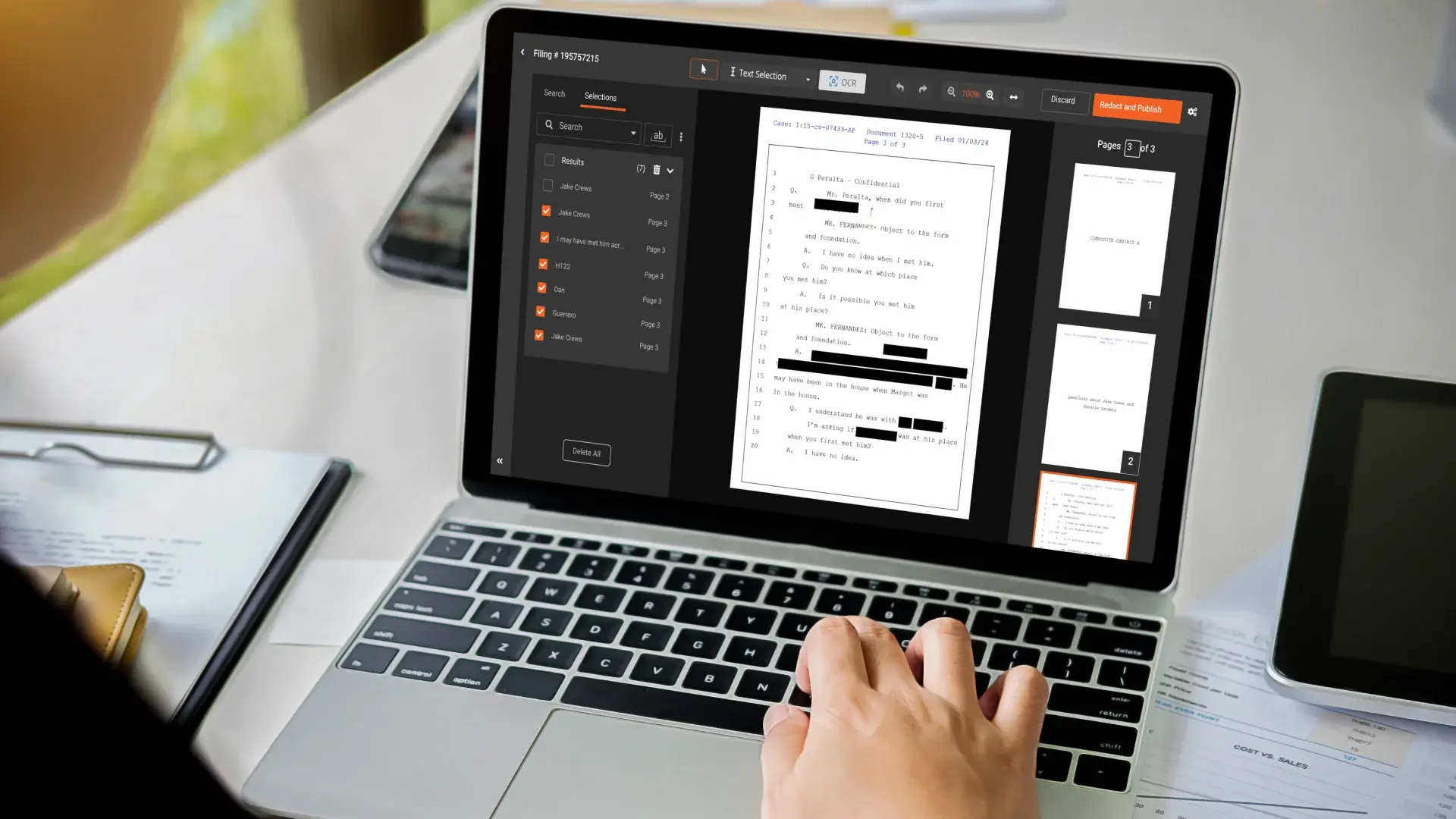
Redaction software automatically detects and removes sensitive information from videos, audio recordings, images, and documents. Instead of manually blacking out names, faces, account numbers, or medical records, a redaction tool uses AI to find and obscure that data across every file type you process. VIDIZMO Redactor, for instance, covers 255+ formats and detects 40+ PII types including spoken PII in audio, visual objects in video, and handwritten text in scanned documents.
The pressure to get this right keeps growing. IBM's 2024 Cost of a Data Breach report found that nearly 46 percent of all breaches involve customer personally identifiable information. When that data lives across police body camera footage, call recordings, court filings, and medical records, manual redaction isn't just slow. It's a liability.
This guide reviews the top five redaction software tools for 2026, what each handles well, and where they leave gaps.
What to Look for in Redaction Software
Before comparing tools, get clear on what your workflows actually need. A law enforcement agency processing 10,000 body camera clips per month has different requirements than a legal team redacting 50 depositions. Five criteria apply across almost every use case.
- Format coverage: Does the tool handle your file types? Video-only tools won't help if you also need to redact PDFs and audio recordings.
- AI detection accuracy: Look for configurable confidence thresholds so you can tune precision vs. recall. Redacting too little is a compliance risk; redacting too much is an operational one.
- Workflow automation: Can the tool process files in bulk, unattended, overnight? Manual file-by-file workflows don't scale.
- Audit trail and defensibility: Every redaction decision should be logged with who made it, when, and why. This matters for FOIA, eDiscovery, and HIPAA audits.
- Deployment options: Agencies with air-gapped environments or strict data residency requirements can't use cloud-only tools.
Top 5 Redaction Software Tools
1. VIDIZMO Redactor
VIDIZMO Redactor is built for organizations that need to redact at volume across every media type. It covers video, audio, images, PDFs, DOCX, XLSX, PPTX, and scanned documents in one platform. The AI detects faces, license plates, weapons, vehicles, and custom objects in video; 33+ spoken PII categories in audio (names, SSNs, credit card numbers, phone numbers, and more); and both printed and handwritten text in documents via OCR and ICR.
Three capabilities set it apart. First, the accuracy controls let you set a confidence threshold anywhere from 25% to 90% and choose between Small, Medium, and Large AI models depending on your speed vs. accuracy tradeoff. Second, the bulk processing engine has been tested with two million recordings, with fully automated overnight queue processing for zero-touch workflows. Third, FOIA teams get exemption codes mapped to redaction decisions, so every disclosure is legally defensible.
Deployment options include SaaS (shared or dedicated), Azure Government Cloud, on-premises, and hybrid. The platform supports CJIS-compliant deployments and FOIA redaction workflows out of the box.
Best for: Government agencies, law enforcement, healthcare, legal teams, and call centers with high-volume or multi-format redaction needs.
Pricing: Consumption-based pricing on Processing Units; contact for custom quotes.
See how VIDIZMO Redactor handles your specific file types. Start a free trial.
2. CaseGuard
CaseGuard is a desktop application built primarily for law enforcement. It handles video redaction reasonably well and includes AI face and license plate detection. The interface is approachable for non-technical users, and the monthly pricing ($99 to $329 per month depending on tier, as of early 2026) is accessible for smaller departments.
The limitations show up at scale. CaseGuard is a desktop-only tool, so bulk processing across a network or automating overnight workflows isn't straightforward. It also lacks the document and audio redaction capabilities that broader-format platforms provide. If your team only needs video redaction for a handful of officers, it works. If you're processing hundreds of files weekly across multiple formats, you'll hit its ceiling.
Best for: Small law enforcement agencies with primarily video redaction needs.
Pricing: $99 to $329/month (as of early 2026).
3. Veritone Redact
Veritone Redact is a cloud-based tool that integrates into Veritone's broader AI media platform. It handles video redaction with AI face and object detection, and organizations already running Veritone's platform can manage and search media assets alongside their redaction queue in a single interface.
The annual pricing model ($9,521.99 per year for 100 hours of content, as of early 2026) gets expensive quickly for high-volume use. It's also cloud-only, which rules it out for agencies with strict data residency or air-gapped requirements. Document and audio redaction aren't part of its core feature set, so teams handling mixed media still need separate tools.
Best for: Organizations already using Veritone's AI platform that need basic video redaction.
Pricing: ~$9,521.99/year for 100 hours (as of early 2026).
4. Axon Redaction Assistant
Axon bundles a redaction assistant into its Evidence.com platform. If you're already using Axon body cameras, the integration is convenient. The tool handles face blurring and some automated detection for footage captured on Axon hardware.
The hardware dependency is a real constraint. Axon Redaction Assistant is designed around Axon's ecosystem, so it doesn't work well with footage from other camera vendors or with documents, audio, and images outside that environment. It's cloud-only with no on-premises option, and the per-user pricing ($108/user as of early 2026) adds up for larger deployments. For agencies that already run Axon hardware and only need video redaction, it covers the basics. For everyone else, the format and deployment limitations are significant.
Best for: Axon hardware customers needing basic video redaction within Evidence.com.
Pricing: $108/user as an add-on license (as of early 2026).
5. Objective Redact
Objective Redact focuses on document redaction for government and legal teams. It handles PDFs and Word documents with automated PII detection and supports FOIA exemption codes for Australian and New Zealand government workflows. The interface is clean and the document-specific feature set is solid.
The gap is obvious: it doesn't handle video, audio, or images. For organizations whose redaction work is exclusively document-based, it's a capable option. But most government agencies, law enforcement, and healthcare organizations deal with mixed media. When a FOIA request includes both a police report and surveillance footage, you're back to managing two separate tools.
Best for: Organizations with document-only redaction workflows (primarily Australian/NZ government).
Pricing: Starting ~$76.49/month (as of early 2026).
Redaction Software Feature Comparison
.jpg?width=800&height=517&name=image%20(11).jpg)
How to Choose the Right Redaction Software for Your Organization
The right choice depends on two things: what you're redacting today and what you'll need to redact in two years.
If your workflow is exclusively video and you're a small agency without a large IT footprint, CaseGuard is an accessible entry point. If you're inside Axon's ecosystem and only need to redact body camera footage, the built-in assistant removes integration headaches. For document-only workflows in Australian or New Zealand government, Objective Redact covers the ground.
But if you're handling any combination of video, audio, documents, or images, or if you're processing more than a few dozen files per week, single-format and desktop-only tools will create a fragmented, unsustainable workflow. That's where a platform like VIDIZMO Redactor makes sense.
Two questions worth asking any vendor: Can the system process files without a human operator present? And can you deploy it in a network environment that meets your security requirements? The answers will filter out most of the field quickly.
If you're also weighing whether to handle redaction in-house or outsource it, VIDIZMO offers a managed redaction service with dual QA review, which can work alongside the software for high-priority or overflow batches.
Who Uses Redaction Software and Why It Matters
Redaction software shows up across more industries than most people expect.
Law enforcement agencies use it for body camera footage, 911 recordings, surveillance video, and interview recordings before public release under FOIA or state open records laws. Manual redaction of a single hour of body camera footage can take an analyst four to eight hours, based on agency-reported workflows. AI automation cuts that to minutes.
Healthcare organizations redact PHI from medical records, patient consultation videos, insurance claims, and telehealth recordings. Between 2009 and 2022, over 382 million healthcare records were exposed, according to HIPAA Journal. Automated redaction reduces the risk surface significantly.
Legal teams handle eDiscovery redaction, where privileged information and sensitive witness details must be removed before document production. The Paul Manafort case is frequently cited as a cautionary example: improperly redacted court filings exposed details that were supposed to remain confidential.
Call centers need to redact spoken PII from call recordings, including credit card numbers read aloud, SSNs, and account details. PCI-DSS compliance requires this, and manual review of thousands of daily calls isn't feasible.
The Bottom Line on Redaction Software
Most teams start with a point tool because it solves today's problem. Six months later, they're managing two or three separate tools, writing manual procedures to bridge the gaps, and wondering why their analysts still spend half their day on redaction tasks the software was supposed to handle.
The organizations that get ahead of this problem choose a platform with the format coverage and automation capabilities to handle what's coming, not just what's in the queue today. For most government agencies, law enforcement departments, healthcare organizations, and legal teams, that means multi-format support, bulk processing, configurable AI accuracy, and deployment options that match their security environment.
VIDIZMO Redactor is built for those requirements. You can request a free trial to test it against your actual file types and workflows, or talk to a redaction specialist about volume, deployment, and compliance fit.

FAQ
Frequently Asked Questions
What is redaction software?
Redaction software detects and removes sensitive information from files before those files are shared, published, or archived. It can work on video (blurring faces, license plates, and objects), audio (muting spoken PII like names and credit card numbers), documents (blacking out text patterns and images), and images. VIDIZMO Redactor supports all four media types in one platform, covering 255+ file formats and 40+ PII types.
How does AI redaction software work?
AI redaction uses computer vision models to detect visual elements in video and images (faces, license plates, people, vehicles), natural language processing to identify PII in text and spoken audio, and OCR to read text in scanned or handwritten documents. VIDIZMO Redactor lets you configure the confidence threshold for AI detections, so you control how aggressive or conservative the automated redaction is before a human reviewer sees the results.
What types of files can redaction software handle?
That depends on the tool. Video-centric tools like CaseGuard and Veritone handle MP4, MOV, and similar formats but don't cover documents or audio. VIDIZMO Redactor handles 255+ formats: video (MP4, AVI, MKV, body cam proprietary formats), audio (MP3, WAV, call recordings), images (JPG, PNG, TIFF, DICOM for medical imaging), and documents (PDF, DOCX, XLSX, PPTX, scanned forms with OCR). If your workflow involves more than one media type, format coverage is one of the first questions to ask.
How does VIDIZMO Redactor compare to CaseGuard?
CaseGuard is a desktop application focused on video redaction for law enforcement, priced at $99 to $329 per month. VIDIZMO Redactor is a cloud or on-premises platform that covers video, audio, documents, and images with bulk processing, automated overnight workflows, FOIA exemption codes, and deployment options including government cloud and air-gapped on-premises environments. CaseGuard works for small agencies with straightforward video needs; VIDIZMO fits organizations with higher volume or multi-format requirements.
What compliance standards does redaction software need to support?
It depends on your industry. Law enforcement agencies typically need CJIS compliance and support for FOIA exemption codes. Healthcare organizations need HIPAA-compliant deployments. Call centers handling payment data need PCI-DSS compliance. Government agencies with federal contracts may need FedRAMP High support. VIDIZMO Redactor supports CJIS-compliant deployments on Azure Government, HIPAA-compliant deployments, and FedRAMP High deployments via Azure Government Cloud, with ISO 27001:2022 certification held directly by VIDIZMO.
Can redaction software process large volumes of files automatically?
Yes, if you choose a platform built for it. VIDIZMO Redactor has been tested with over 1.1 million recordings and supports fully automated bulk processing with admin-configured auto-redaction policies. Files can be queued for overnight processing with zero human intervention until the review stage. Most desktop tools and single-user SaaS tools don't support this kind of throughput without manual operator involvement.
TopicsRedaction
About the author
Zain Noor is a Product Marketing Executive at VIDIZMO with expertise in AI redaction technology. He focuses on how public safety agencies, government bodies, and commercial organizations adopt and operationalize video intelligence at scale.
You may also like

Video Redaction Best Practices: Motion, Frame Rates, Tracking and Failing Safe
I led our video redaction project for a county public safety agency where two people handled every disclosure, and ...

Redacting Dash Cam, Body Cam and Drone Footage From a Moving Camera
A fleet claims manager preparing crash footage for an insurer and defense counsel is doing a different job from a ...

Why Frame-Rate Headers Lie: Redacting Variable Frame Rate Video
A video file keeps time frame by frame, and the frames-per-second figure a player displays is a summary of that timing, ...