Video has become the primary medium for capturing evidence, customer interactions, training sessions, and public-facing communications. From body-worn cameras and CCTV systems to screen recordings and mobile footage, organizations now generate vast volumes of video every day.
However, video almost always contains sensitive information, such as faces, license plates, ID cards, screens, addresses, and other forms of personally identifiable information (PII). As privacy regulations tighten and public transparency increases, organizations face a growing challenge:
How do you release or share video at scale without exposing private data or slowing down operations?
This is where object detection–based video redaction software plays a critical role.
This guide explains:
- What object detection-based video redaction is
- Which features matter in real-world deployments
- How to evaluate accuracy beyond marketing claims
- Common use cases across regulated industries
- Why enterprises need more than “AI detection.”
- How VIDIZMO Redactor fits into a complete redaction workflow
What Is Object Detection–Based Video Redaction?
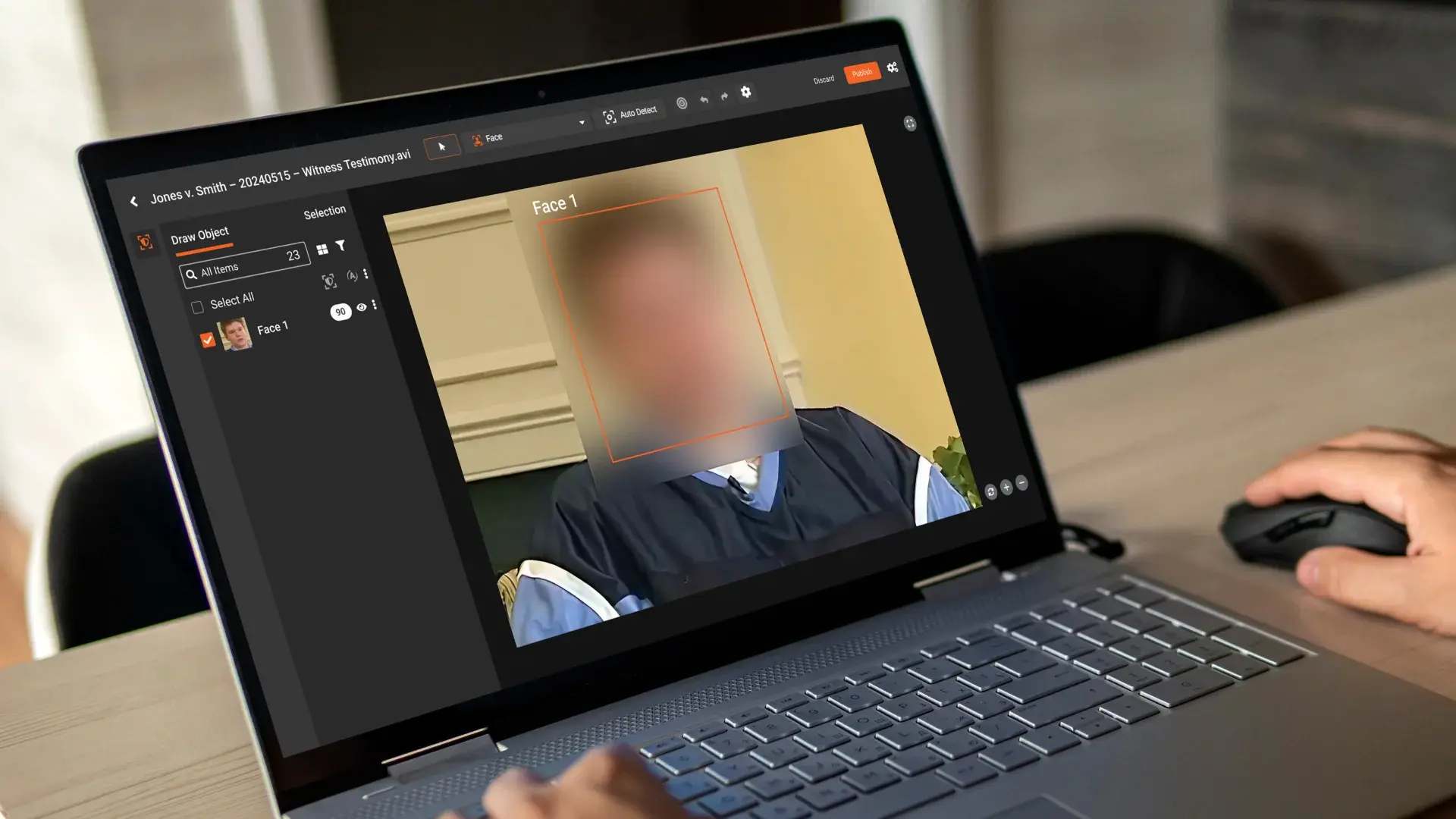
Object detection-based video redaction uses AI models to automatically identify sensitive objects within video frames, such as faces, license plates, screens, or documents, and applies a privacy mask so the information is no longer visible.
Instead of manually reviewing footage frame by frame, teams can:
- Select which objects to detect (faces, plates, people, screens, etc.)
- Run automated detection and masking across entire videos
- Review and correct edge cases
- Export a compliant, shareable version of the footage
The primary benefit is speed and consistency at scale, especially when redacting hours—or thousands of hours of video.
Why Object Detection Alone Is Not Enough
Many redaction tools stop at detection. In controlled demos, detection accuracy may look impressive but real-world video is messy.
In production environments, organizations quickly discover that:
- Objects move unpredictably
- Lighting changes constantly
- Subjects are partially occluded
- Camera quality varies widely
- A single missed frame can create compliance risk
Detection is only the first step.
Enterprise-grade video redaction requires tracking, review workflows, auditability, and governance to ensure defensible privacy outcomes.
Core Features of Enterprise Object Detection–Based Video Redaction Software
1. Automated Detection of Common Sensitive Objects
A robust redaction platform should support reliable detection of:
- Faces (front-facing, angled, partially occluded)
- License plates (different formats, angles, and motion conditions)
- People/bodies (for broader anonymization)
- Screens and monitors
- Documents and ID cards (badges, paper records)
- Optional: logos, tattoos, signage, house numbers
Detection must work across varied camera types, not just ideal footage.
2. Persistent Object Tracking Across Frames
Detection without tracking creates unstable masks, missed frames, and heavy manual cleanup.
Effective redaction software should:
- Lock masks to objects as they move
- Handle camera shake and zoom
- Maintain masks during occlusion
- Adapt to perspective changes
This is essential for maintaining privacy throughout the video, not just in individual frames.
3. Flexible Masking and Privacy Controls
Different use cases require different masking styles. Enterprise tools typically support:
- Blur (Gaussian or motion blur)
- Pixelation
- Solid fill or blackout
- Adjustable shape, padding, and intensity
- Different masking rules per object type
This flexibility helps organizations balance privacy, clarity, and usability.
4. Human Review and Assisted Corrections
AI accelerates redaction—but humans ensure compliance.
Look for platforms that support:
- Frame-accurate timeline review
- Easy add/remove/edit mask tools
- Keyframe-based corrections
- Batch edits across multiple segments
- Full audit trails of redaction actions
This hybrid approach is critical for regulated environments.
5. Audio Redaction and Speech Privacy
Video privacy isn’t just visual.
Names, addresses, and case details are often spoken aloud. Enterprise redaction workflows should include:
- Muting or bleeping sensitive audio segments
- Removing entire audio sections when required
- Managing audio privacy alongside visual redaction
6. Export, Evidence Integrity, and Output Control
For legal, investigative, and compliance workflows, output quality matters.
Key capabilities include:
- Multiple export formats and resolutions
- Optional watermarking
- Metadata handling
- Clear separation of original and redacted files
- Chain-of-custody support where required
7. Security, Governance, and Compliance Controls
Redacting sensitive video requires a secure platform, including:
- Role-based access control (RBAC)
- Encryption at rest and in transit
- Logging and auditing
- Retention and governance policies
- Flexible deployment (cloud, on-prem, hybrid)
These features distinguish enterprise platforms from basic redaction tools.
Understanding Accuracy in Video Redaction
Accuracy in video redaction is not a single metric.
Key Accuracy Dimensions
- Precision: Are the objects being redacted actually sensitive?
- Recall: Are all sensitive objects being detected?
- Tracking Stability: Do masks remain applied across frames?
- Robustness: Does performance hold under poor lighting, motion blur, or low resolution?
In regulated environments, high recall is often more important than perfect precision, because the cost of missing sensitive data is higher than over-redaction.
How to Evaluate a Redaction Tool in Practice
The most reliable way to evaluate redaction software is to test it against your own footage.
A practical evaluation includes:
- Measuring missed sensitive objects
- Assessing tracking stability
- Estimating time saved vs manual redaction
- Measuring human review effort to reach “release-ready” status
- Testing across different camera types and conditions
Redaction is a workflow, not a demo; evaluation should reflect that.
Real-World Use Cases for Object Detection–Based Redaction
1. Law Enforcement and FOIA Requests
- Faces of bystanders and minors
- License plates
- Addresses, signage, and documents
- Screens and dashboards are visible in the footage
2. Government and Municipal Video Releases
- Surveillance footage
- Incident response videos
- Public meeting recordings
3. Healthcare and Patient Privacy
- Patient faces
- Medical charts on screens
- Identifying details in common areas
4. Retail, Banking, and Insurance Investigations
- Customer faces
- Payment cards or documents
- Screens showing account data
5. Education and Campus Security
- Students and minors
- Sensitive signage
- Classroom and training recordings
6. Enterprise Training and Screen Recordings
- Employee badges
- Internal dashboards
- Customer data visible on screens
VIDIZMO Redactor: A Complete Enterprise Video Redaction Solution
Object detection is powerful—but enterprise redaction requires more than AI models.
VIDIZMO Redactor is designed as a complete, end-to-end redaction platform, combining automation with review workflows, governance, and deployment flexibility.
End-to-End Redaction Workflow
VIDIZMO Redactor supports:
- Secure video ingestion
- Automated detection of sensitive entities
- Configurable masking styles
- Human review and refinement
- Export of compliant, shareable copies
This “AI + human oversight + governance” approach enables scalable, defensible redaction.
Built for Enterprise and Regulated Environments
VIDIZMO Redactor is designed to support:
- Multi-user workflows
- Role-based access controls
- Full auditing and logging
- Secure storage and handling
- Flexible deployment models
This makes it suitable for high-volume, high-stakes use cases where privacy, accountability, and reliability are essential.
Best Practices for Implementing Video Redaction at Scale
- Define a clear redaction policy by use case
- Standardize redaction presets (faces, plates, screens)
- Use AI for speed and humans for certainty
- Keep original files immutable
- Store redacted outputs separately
- Audit who redacted what, when, and why
- Continuously refine workflows based on edge cases
Key Takeaways
- Object detection is necessary but not sufficient for compliant video redaction
- Accuracy includes detection, tracking, and human review
- High recall is critical in regulated environments
- Redaction is an operational workflow, not a standalone feature
- Enterprise platforms must combine automation, governance, and security
- VIDIZMO Redactor is designed to support real-world, high-volume redaction needs
If your organization handles sensitive video and needs to redact footage at scale, evaluating redaction software against real-world conditions is essential.
See how VIDIZMO Redactor performs on your own footage and understand what enterprise-grade video redaction looks like in practice.
Start Your Free Trial Today No Credit Card Needed

FAQ
Frequently Asked Questions
What Is Object Detection–Based Video Redaction?
Why Object Detection Alone Is Not Enough
Core Features of Enterprise Object Detection–Based Video Redaction Software
Understanding Accuracy in Video Redaction
How to Evaluate a Redaction Tool in Practice
Real-World Use Cases for Object Detection–Based Redaction
VIDIZMO Redactor: A Complete Enterprise Video Redaction Solution
Best Practices for Implementing Video Redaction at Scale
How accurate is AI-based video redaction?
Accuracy in video redaction covers four dimensions: precision (are detected objects actually sensitive?), recall (are all sensitive objects caught?), tracking stability (do masks hold across frames?), and robustness under poor lighting or motion blur. In regulated environments, high recall matters most since a single missed frame can create compliance risk. No AI system is 100% accurate, which is why human review remains a critical part of any enterprise workflow.
What is the difference between object detection and object tracking in video redaction?
Object detection identifies sensitive elements within individual frames. Object tracking locks those masks to moving objects across the entire video. Without tracking, masks become unstable, drop between frames, and require significant manual correction. For compliance-grade redaction, both are required together, not just detection alone.
Can video redaction software handle body-worn camera and CCTV footage?
Yes, enterprise redaction tools are built to handle footage from body-worn cameras, CCTV systems, dashcams, and mobile devices. The challenge is that real-world footage involves variable lighting, camera shake, partial occlusion, and low resolution. A reliable platform should maintain detection and tracking accuracy across these conditions, not just in controlled demo environments.
Does video redaction software also redact audio?
It should. Sensitive information is frequently spoken aloud in video footage, including names, addresses, and case details. Enterprise-grade platforms support muting or bleeping specific audio segments, removing entire sections, and managing audio privacy alongside visual redaction. Tools that only mask visuals leave a significant compliance gap.
Is VIDIZMO Redactor suitable for high-volume enterprise redaction?
Yes. VIDIZMO Redactor is built for high-volume, regulated environments. It supports automated detection, configurable masking, human review workflows, role-based access controls, full audit logging, and flexible deployment across cloud, on-premises, or hybrid environments. This makes it suitable for law enforcement, government, healthcare, and legal teams processing large quantities of sensitive footage regularly.
TopicsRedaction
About the author
Zain Noor is a Product Marketing Executive at VIDIZMO with expertise in AI redaction technology. He focuses on how public safety agencies, government bodies, and commercial organizations adopt and operationalize video intelligence at scale.
You may also like

What Privacy Laws Require You to Redact From AI Training Data
The data you train an AI on is regulated the same way as any other copy of that data. If it holds personal information, ...
How to Redact Your Data Before Training or Customizing AI
Using your own data to train or customize an AI is different from feeding a document into a chatbot. When you train, ...
EOB and Claim Form Redaction: A Practical Guide for Billing Teams
Generic PHI redaction guidance does not account for the way billing documents are structured. EOBs often bundle ...