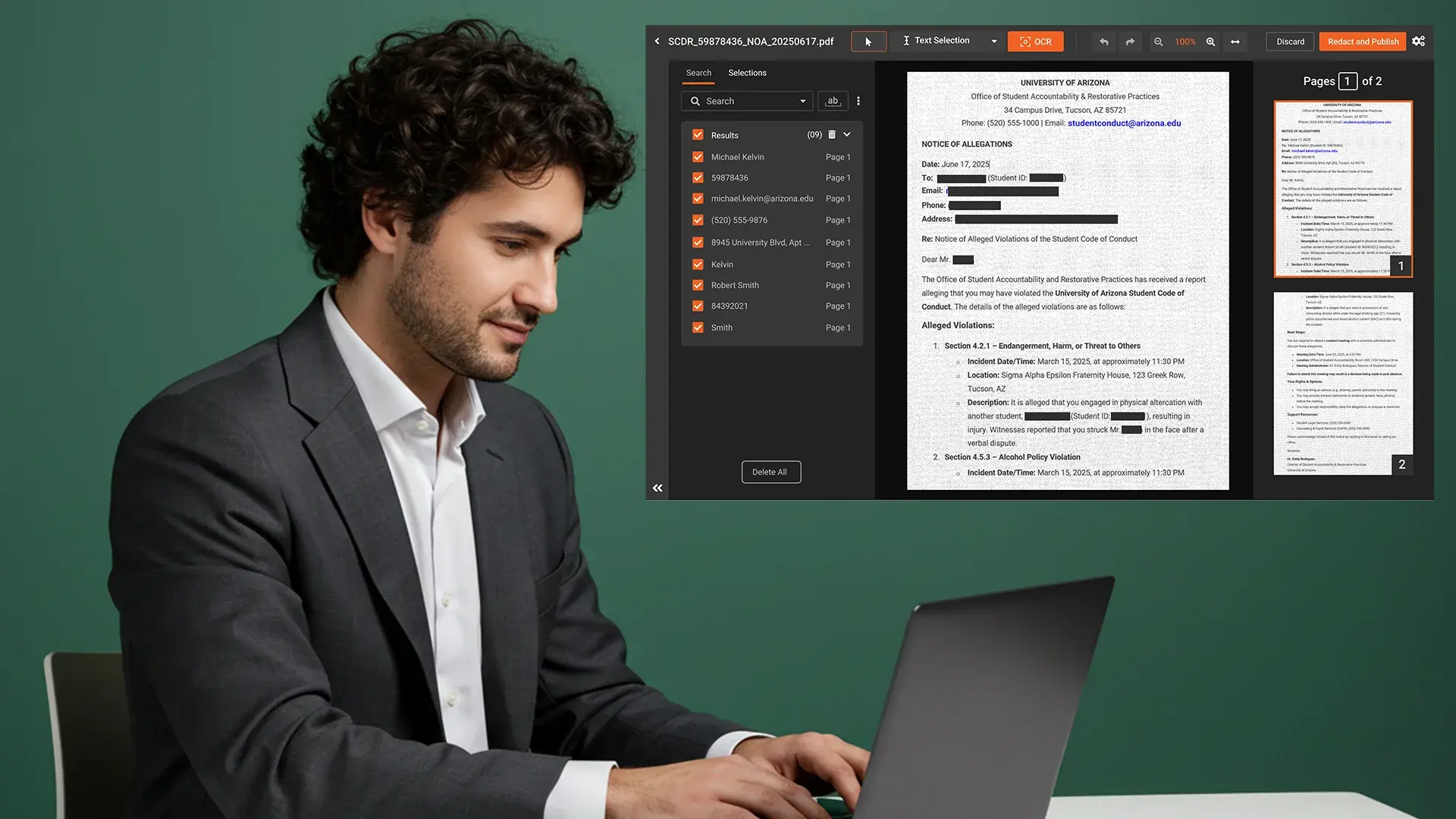
Optical character recognition (OCR) redaction software reads the words on a scanned page or a photograph of a document, finds the personal information among them, and removes it from the page so it can't be recovered. The reading step is where most of the risk sits. A scan stores its words as pixels, so until something has read them a redaction tool has nothing to search, and the names, account numbers and dates of birth on a scanned record pass through untouched.
OCR redaction is really three jobs in a row, and each can fail without the others noticing. The page has to be read, the personal information has to be recognized in what was read, and the pixels that carry it have to be removed rather than covered. This guide walks through each job as VIDIZMO Redactor runs it, sets out a workflow you can check any tool against, and is plain about the part that still needs a person, which is handwriting.
What OCR redaction software does with a scanned page
A PDF created on a computer carries its words as text, which is why a keyword search can find a name in it. A scanned PDF, a faxed form or a phone photograph of a letter carries only a picture of the words. OCR turns that picture back into text, and good OCR also records where each word sits on the page, because that position is what lets a redaction cover one name inside a line instead of blacking out the whole line.
After that the job resembles redacting any other document, with one difference that catches people out. On a scan the pixels carry the words, so deleting the recognized text achieves nothing on its own, and the redaction has to blank the image under each box. If the scanner also added an invisible text layer to make the file searchable, that hidden copy has to go as well. Our guide to redacting a scanned PDF covers every copy of a word a scan can hold.
How Redactor reads printed and handwritten text
Redactor reads every scanned page before detection starts. It checks each page's orientation first, so a page stored sideways or upside down is read the right way up, and the redactions are put back on the page in its original orientation. Text is located word by word, which keeps each redaction to the words it is meant to cover. Documents and images are read as Latin script, and how the script of each text region is classified is on the OCR and text recognition page.
Forms need their own handling because their layout breaks the assumptions detection relies on. A label can sit after its value instead of before it, two fields can run together without a space, and a long number can wrap onto a second line. Redactor looks for labels on both sides of a value, masks fields that run together as a single region, and masks both halves of a number that a line break has split.
Handwritten signatures are a separate case from handwritten words. A signature is detected as an object on the page, much as a face is, so it is found whether it was signed in ink on a scan or pasted into a digital document as an image. Our article on signatures, forms and stamps covers them.
Handwriting is read, and the pages still get reviewed
Redactor's OCR reads handwritten text as well as printed text. Like any recognition model it reads handwriting less reliably than print, and results vary with the writing, so a neatly printed entry in a form field and a hurried note in a margin can come back very differently. A handwritten name may be read correctly, misread so that detection doesn't recognize it as a name, or missed altogether, and a miss leaves no trace in the results.
For anyone releasing records, that means pages with handwriting should be reviewed before release. The reviewer compares what was read and detected with what is written, and draws a region over anything the OCR missed, which removes it in exactly the same way as a detected region. Finding those pages in a batch of thousands is a task in itself, and our article on handwritten, rotated and skewed scans sets out how to triage them, from form types to pages that return much less text than they visibly hold.
The same review belongs on pages that are hard for any OCR to read: fine print, faded ink and carbon copies, fax-quality pages, and pages fed through the scanner at an angle.
An OCR and redaction workflow, step by step
This is how a batch of scanned records moves through Redactor from upload to release. The order matters more than the product, so the same steps work as a checklist for any OCR redaction software.
- Bring the documents in. Upload scanned PDFs, image files and Office documents one at a time or as a batch. Each file in a batch runs as its own job without anyone watching, so a large set submitted at the end of the day is processed overnight, and a problem with one file holds up only that file.
- Choose what to find and how to mask it. Select the kinds of personal information to detect, such as names, contact details, government and financial identifiers and medical identifiers, then set the confidence threshold and the masking style. The output policy is chosen here too, and by default the original is kept and the redaction is produced as a separate copy.
- Let OCR read the pages. Each page is turned upright if it was stored on its side, then read, printed and handwritten text alike, with the position of the text recorded.
- Run detection. Personal information is detected in the recognized text, and signatures and faces are detected as objects on the page, including faces in photographs embedded inside a PDF.
- Review what was found. A reviewer deletes false positives and draws regions over anything detection missed, giving pages with handwriting, fine print or poor scan quality the closest look. Exemption codes can be added to regions here, so the released copy shows the basis for each withholding.
- Produce the redacted copy. The text and image pixels under each region are removed rather than covered, and the file is written out fresh, so no earlier version of a page survives inside it. Whatever the source format, the redacted copy is a PDF.
- Check before release. A job that masked nothing is reported as skipped and is never published as redacted, so an untouched file cannot go out under a redacted label. A two-minute test is still worth doing: try to copy text from a redacted area, and search the output for a name you know was removed.
How OCR redaction differs from redacting a text-layer PDF
Three kinds of page turn up in the same batch, and each needs something different from the redaction.
| PDF created on a computer | Scanned page, image only | Searchable scan | |
|---|---|---|---|
| Where the words are | In the text layer | Only in the image pixels | In the image, plus an invisible text layer the scanner added |
| How a tool finds them | Reads the text layer | OCR reads the image first | From either copy, and the two may not agree |
| What the redaction must remove | The text under the box | The pixels under the box | The pixels and the hidden text |
| How it usually goes wrong | A box over text that can still be selected and copied | A box drawn on top that leaves the pixels in the file | One copy removed and the other left behind |
The deeper difference is that a text-layer PDF states exactly what is on the page, while a scan has to be interpreted first, and everything after that depends on the interpretation. If OCR misreads one digit of an account number, a rule looking for that number's format no longer matches it. That is why review carries more weight on scanned material than on files created digitally, and why an honest answer to whether a tool reads handwriting comes with a condition attached.
Redactor removes both the text and the pixels under every region, so the same redaction holds on all three kinds of page. A PDF can keep content in other places too, such as earlier revisions, page thumbnails and attachments, and our guide to what black boxes miss in a PDF explains how each is dealt with.
Running OCR redaction offline
Some scanned records can't be sent to an outside service to be read, because of a contract, a data-residency rule, or a network kept off the internet by design. Redactor can be deployed on-premises or in an air-gapped network, and OCR, detection and redaction all run inside that deployment, so pages are read without leaving it. The deployment options are on the document redaction software page, along with the file formats Redactor accepts.
Questions to ask about any OCR redaction software
A demonstration on clean, upright, typed pages shows very little, because those are the pages every tool handles. These questions get closer to how a tool behaves on real records:
- Does it read scanned pages itself, or does it depend on a text layer someone else added?
- Does it locate text word by word, so a redaction covers a name and not the whole line?
- What does the vendor say about handwriting, and is the answer specific about reliability? A promise that handwriting is read perfectly deserves the same doubt as any other perfect claim.
- Does the redaction blank the pixels and remove any hidden text layer, or does it draw a box on top?
- Is there a review step before release where a person can add regions the software missed?
- Can it run where your records are required to stay?
Our PDF redaction tool guide covers the wider evaluation, from detection to exemption codes and audit trails, and the best test of all is a batch of your own worst scans.
Start a free trial on your own scans. No credit card needed.

FAQ
Frequently Asked Questions
Can OCR redaction software read handwritten documents?
Redactor's OCR reads handwritten text as well as printed text. Like any recognition model, it reads handwriting less reliably than print, and results vary with the writing, so pages with handwriting should be reviewed before release. Anything the OCR misses can still be redacted by drawing a region over it, and handwritten signatures are detected separately, as objects on the page.
What are the steps in an OCR and redaction workflow?
Bring the scanned documents in, choose what personal information to detect and how to mask it, let OCR read each page, and run detection on the recognized text and on the page itself. A reviewer then checks the results and draws regions over anything missed, the redacted copy is produced with the text and pixels under each region removed, and the output is checked before release.
Can OCR redaction run offline?
Yes. Redactor can be deployed on-premises or in an air-gapped network, and OCR, detection and redaction run inside that deployment, so scanned records are read and redacted without leaving it.
Is redacting a scanned PDF different from redacting a PDF created on a computer?
Yes. A PDF created on a computer holds its words as text, so the redaction deletes the text. A scan holds its words as pixels, so the redaction has to blank the image under each box, and a searchable scan also carries a hidden text layer that has to be removed. Redactor removes both the text and the pixels under every region.
Can OCR redaction software handle scanned medical records?
Yes. Redactor reads scanned medical records with OCR and detects names, contact details and medical identifiers in the recognized text, along with faces in embedded photographs. Handwritten clinical notes are read too, but less reliably than print, so those pages should be reviewed before release. Redactor's redaction capabilities help healthcare organizations meet their Health Insurance Portability and Accountability Act (HIPAA) obligations for patient information.
TopicsRedaction
About the author
Zain Noor is a Product Marketing Executive at VIDIZMO with expertise in AI redaction technology. He focuses on how public safety agencies, government bodies, and commercial organizations adopt and operationalize video intelligence at scale.
You may also like
Video Redaction Best Practices: Motion, Frame Rates, Tracking and Failing Safe
I led our video redaction project for a county public safety agency where two people handled every disclosure, and ...
Redacting Dash Cam, Body Cam and Drone Footage From a Moving Camera
A fleet claims manager preparing crash footage for an insurer and defense counsel is doing a different job from a ...
Why Frame-Rate Headers Lie: Redacting Variable Frame Rate Video
A video file keeps time frame by frame, and the frames-per-second figure a player displays is a summary of that timing, ...