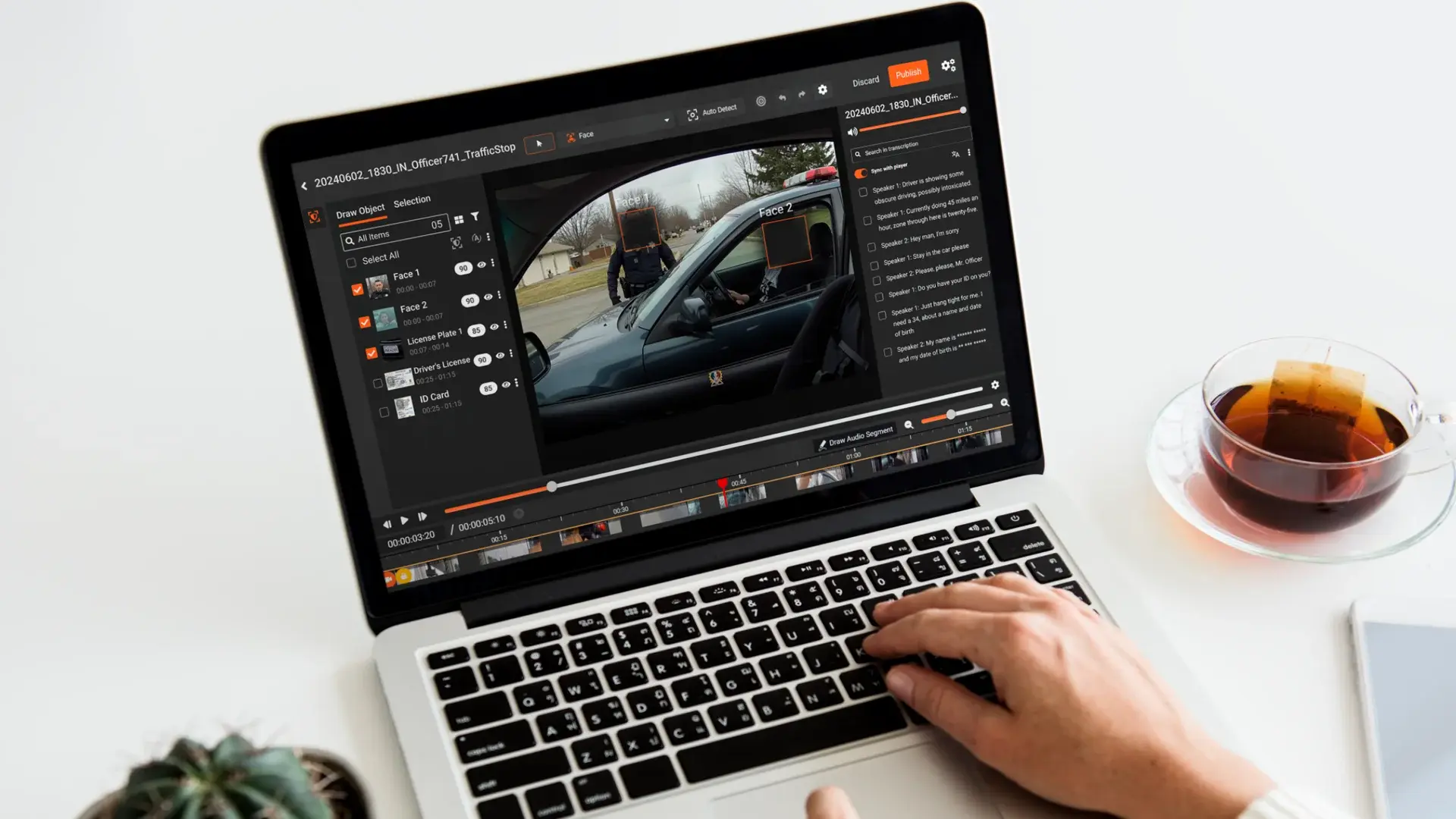
Caller-submitted 911 video is a relatively new category of footage, and most redaction guides have not caught up. Tools like Prepared 911 allow dispatchers to request live video from callers during emergencies: a crash scene, a house fire, a crime in progress. That footage captures real, identifiable people at some of the most vulnerable moments of their lives. When a public records request arrives for that recording, it does not get a pass on redaction.
Most guidance on video redaction is written with body cameras and dashcams in mind. The workflow for caller-submitted video is different. The file starts on a third-party platform, may contain content that was never meant for public distribution, and must be processed through a compliant redaction tool before it leaves your environment. This post covers exactly what PSAPs and 911 centers need to know.
What Is Caller-Submitted 911 Video?
Platforms like Prepared 911 let dispatchers send a secure link to a caller's phone. The caller taps the link and their camera begins streaming live video to the dispatcher. This video is stored on the platform's servers and can be downloaded by the agency after the call.
The footage that results is fundamentally different from body cam or dashcam video:
- The caller did not consent to public release. They shared video with emergency services under duress.
- The content often includes bystanders, minors, residential interiors, medical emergencies, and other individuals who were not parties to the call.
- House numbers, faces, license plates, and identifiable locations are routinely visible.
- In medical calls, the footage may capture patients receiving care, making it protected under HIPAA.
Once your agency downloads and retains that footage, it falls under the same public records obligations as any other file you hold. The platform it came from is irrelevant. What matters is who holds it now.
Why Caller Video Requires Redaction Before Release
Public Records Law
Open records statutes, whether FOIA at the federal level or state equivalents like state FOIA, PIA, or CPRA, apply to records held by public agencies. Once that caller video is downloaded and stored by your PSAP or county safety department, it is a public record. That means it is subject to disclosure requests, and it must be reviewed and redacted before release.
The exemptions that apply depend on what is in the video. Footage of a minor, for example, is typically exempt from disclosure in most state open records frameworks. Footage showing a victim's face may be exempt under witness protection provisions. These exemptions do not eliminate the burden. They create a legal reason to redact specific elements while releasing the rest.
For a deeper look at how agencies manage high-volume disclosure obligations, see How to Handle a Surge in Records Requests After a High-Profile Incident and FOIA Redaction: How Agencies Clear Backlogs with Managed Services.
CJIS
If the 911 call relates to criminal activity, such as a robbery, an assault, or a shooting in progress, the footage may contain criminal justice information governed by the CJIS Security Policy. CJIS applies not just to how law enforcement handles data, but to how that data is transmitted and processed. Sending the file to a cloud redaction tool that does not meet CJIS requirements can itself be a violation.
HIPAA
When caller-submitted video captures a patient receiving emergency medical care, such as paramedics on scene, an injury, or a medical episode, it becomes protected health information (PHI) under HIPAA. The same applies to EMS-adjacent 911 calls where a dispatcher requests video of a patient's condition. Any vendor processing that footage on your behalf must have a signed Business Associate Agreement (BAA). A cloud redaction tool without a BAA is not an option for this content.
To understand the full scope of HIPAA obligations for video and audio content, see What Is HIPAA and Why Does It Matter for Data Redaction?
The Redaction Workflow for Caller-Submitted 911 Video
Step 1: Download from the source platform
Pull the video file from the Prepared 911 or equivalent platform into your agency's environment. Store it in your evidence management system or a controlled network location, not a personal desktop or shared drive.
Step 2: Upload to your redaction platform
If your redaction tool is on-premise, upload directly from your network. If you use a cloud-based tool, confirm that your BAA is in place and the tool meets your CJIS and HIPAA requirements before uploading. The file should not leave your network to a non-compliant vendor.
For guidance on what on-premise deployment involves, see On-Premises Redaction Software: Requirements and Deployment Checklist.
Step 3: Run automated detection
Your redaction platform's AI should scan for:
- Faces, covering all visible individuals
- Full bodies
- License plates
- House numbers and visible addresses
- Screens showing identifiable information
- Spoken names and identifiers in the audio track
VIDIZMO Redactor detects 40+ PII types across both video and audio in a single pass. AI detection runs across every frame, flagging elements for review rather than requiring manual frame-by-frame work.
Step 4: Review and adjust detections
This is the human review step. Not every detected face needs to be redacted. In some cases, you may want to redact bystanders and minors while preserving a suspect's face for evidentiary purposes. VIDIZMO Redactor's multi-layer redaction architecture lets you manage different redaction decisions on independent layers. You can apply different exemption codes to different elements and export specific combinations based on the request.
Step 5: Export the redacted copy, retain the original
The redacted output is a separate file. The original footage is preserved in your system with its chain of custody log intact. You release the redacted version. The original stays as your evidentiary copy.
For context on why permanent vs. overlay redaction matters at this stage, see Permanent Redaction vs. Overlay Redaction: Difference and Importance.
Step 6: Document and release
Your chain of custody log should record who processed the video, what was redacted, when, and under what authority (exemption codes or legal basis). This documentation is your defense if a release decision is later challenged.
What to Look for in a Redaction Tool for This Use Case
Not every redaction tool handles this scenario. Here are the requirements that matter:
On-premise or closed-environment deployment. Caller-submitted video containing PHI or criminal justice information should not leave your network to be processed on vendor infrastructure. Look for a tool that runs AI processing locally, within your own servers. VIDIZMO Redactor supports full on-premise deployment. All AI runs server-side within your environment, with no dependency on external cloud APIs.
BAA availability for HIPAA-relevant calls. If your agency handles any medical-adjacent 911 calls, you need a vendor willing to sign a BAA. Confirm this before you evaluate.
Selective face redaction. You need to be able to redact one face while preserving another in the same frame. Face attribute controls and layer-based redaction both support this. See How Video Redaction Software Protects Privacy Before Public Release for a broader look at how this works in public safety contexts.
Full-body detection. Faces are not the only identifying feature. A person's clothing, build, and visible posture can be identifying. Full-body redaction is required. For more on why auto-tracking matters in this kind of footage, see Why Auto-Tracking Matters in Body Camera Redaction Software.
Audio PII detection. Spoken names, addresses, and identifiers in the call audio must also be handled, not just the video frames. Learn more about how spoken PII is handled through audio redaction software.
Chain of custody logging. Every action on the file, including who accessed it, what was changed, and when, must be logged and stored within your environment. This log is your legal record.
Ease of use for occasional operators. Records staff at a 911 center may only handle redaction a few times per year. The tool needs to be usable without specialized training.
Common Mistakes to Avoid
Using a cloud-only tool without a signed BAA. If the footage contains PHI and you upload it to a vendor who has not signed a BAA, you have a HIPAA violation before the redaction even starts. Check this first.
Redacting faces but missing full bodies and house numbers. A face-focused tool leaves identifiable information in the frame. Ensure your tool covers bodies, license plates, house numbers, and screens in addition to faces.
No chain of custody on the redacted output. A released video with no documentation of how it was processed is legally indefensible. The log must capture every action.
Evaluating software after a request arrives. The time to identify and set up a compliant redaction tool is before a public records request requires it. Procurement, testing, and BAA negotiation all take time, time you will not have when a 10-day response window starts.
Key Takeaways
- Caller-submitted 911 video is a distinct category from body cam or dashcam footage and requires its own redaction workflow.
- Public records laws apply once the agency holds the footage, regardless of the platform it originated from.
- CJIS applies when footage contains criminal justice information. HIPAA applies when footage captures a patient receiving care.
- On-premise deployment is the safest approach. It ensures footage never leaves the agency's environment for processing.
- Selective face redaction allows agencies to redact minors and victims while preserving suspect visibility.
- Chain of custody logging is required for a legally defensible public records release.
- A redaction tool should be evaluated and ready before a request arrives, not after.