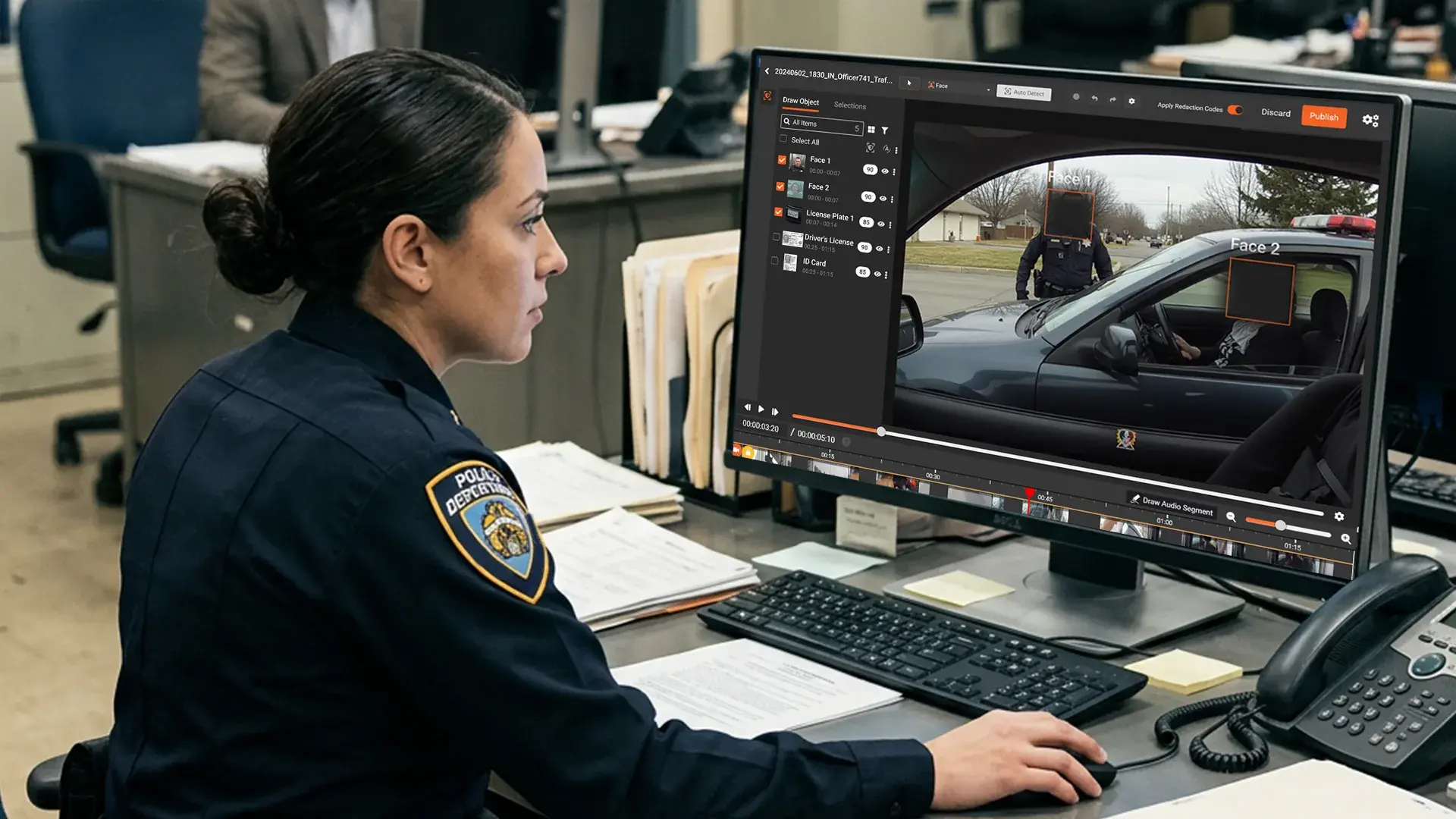
TL;DR. Most BWC redaction content is written for 500-officer departments. Small agencies with under 50 officers, one records clerk, and no dedicated IT face a different problem. This guide covers the small-agency reality, what to actually buy, how to fund it, and what the workflow looks like inside a one-person records unit.
Most body-worn camera redaction content targets large metropolitan departments: 500 officers, dedicated IT, multiple records analysts, a civilian discovery unit. That is not the typical US law enforcement agency.
The large majority of US police departments and sheriff's offices have fewer than 50 sworn officers. Many have under 25. Many counties have one records clerk covering every open records request, discovery response, and public information inquiry. The enterprise-tier tools dominating search results do not fit that reality.
This guide is written for those agencies. Budget numbers that match small-agency economics. Workflow that fits a one-person records unit. Evaluation criteria for teams without dedicated IT.
Body Camera Redaction Challenges for Small Police Departments
A typical small agency: twenty-five sworn officers, two shifts, ten to fifteen officers on duty at a time. Most wear a BWC for the full shift. Dashcam runs on traffic stops and pursuits. Interview room cameras run for most investigative interviews.
Volume adds up fast. A single officer on a routine shift generates two to six hours of BWC footage. Across a department, daily ingest can reach 50 to 150 hours of new video. Most is never reviewed because nothing triggers review. When a records request arrives, the clerk has to pull relevant clips, identify who is in them, redact bystanders and juveniles, and respond inside the state's public records deadline.
Public records volume is rising. Online content creators filing bulk requests, citizens learning their rights, attorneys exploring civil discovery. A department receiving one video request a month five years ago may now be receiving ten. The records clerk has not changed. The tools have not changed. The deadline has not changed.
This is the small-agency BWC compliance problem. For the legal landscape behind it, see our body-worn camera redaction legal guide.
Why Enterprise BWC Redaction Software Fails Small Agencies
Enterprise BWC redaction platforms are built for agencies that can absorb complexity. Fifteen-user minimums, annual commitments, dedicated admin roles, complex policy engines, feature surfaces built for workflows the small agency does not run.
Three problems emerge when a small agency buys enterprise tooling. Cost runs high relative to officer count because pricing tiers assume volumes that do not apply. Implementation load exceeds the agency's IT capacity. Most features go unused because the workflow does not require them.
Small agencies are better served by tooling that matches the actual job: take a video in, redact what the law requires, produce a defensible output with an audit trail, and keep the records clerk inside the deadline.
Body Camera Redaction Software Requirements for Small Agencies
A narrow capability set executed well:
Ease of use. The records clerk should be operating the tool after an hour of training. The interface should not assume prior redaction experience.
Batch processing. A records request typically covers multiple clips or multiple officers. The tool should handle the batch as a single operation.
No server room requirement. Most small agencies do not operate on-premises infrastructure beyond a small IT closet. CJIS-aligned cloud handles this. Where county IT policy requires on-premises, a light footprint needs to be workable. Our on-premises vs cloud redaction guide for law enforcement IT covers the tradeoffs.
Audit trail by default. Every redaction logged with what was redacted, who did it, and when. The log should be an artifact attachable to the records response if challenged.
CJIS compliance. Any tool handling criminal justice information must meet CJIS Security Policy requirements. The FBI's CJIS Security Policy defines the baseline.
BWC system integration. Axon, Motorola, getSafety, Reveal. The redaction tool should pull from the BWC platform rather than require manual export.
Bodycam Audio Redaction: Handling Dispatch Radio and Spoken PII
Most BWC redaction conversations focus on the visual layer: faces, license plates, screens, bystanders. The audio track is where small-agency redaction work quietly breaks down.
A typical traffic stop or domestic call records two audio sources at once. The officer is talking to a subject. The officer's shoulder radio is playing dispatch chatter at the same time. When dispatch runs a name, a date of birth, a driver's license number, or an address, that PII goes onto the recording while the officer is mid-conversation. The audio cannot be muted wholesale because the officer's speech is responsive evidence. The clerk has to identify the dispatch segments specifically and mute only those.
Manual workflows handle this by scrubbing the timeline, listening at half speed, and muting short windows by hand. For a one-hour BWC clip, audio-only review can take longer than the visual redaction.
What small agencies need from the audio layer of a BWC redaction tool:
-
Transcript-driven detection. The platform transcribes the full audio track and tags spoken PII categories: names, addresses, phone numbers, dates of birth, driver's license numbers, license plates. The clerk reviews flagged segments in the transcript rather than scrubbing the timeline.
-
Selective muting. Mute or bleep specific segments without affecting surrounding audio. The officer's speech stays intact. Only the flagged PII is removed.
-
Mixed-source handling. Bodycam audio captures multiple speakers and overlapping sources. Detection should flag PII regardless of which source it appears on, including dispatch radio, in-car radio, witness statements, and bystander conversations.
-
Audit log per audio redaction. Every muted segment is logged with timestamp, PII category, and operator. The audit log covers audio decisions the same way it covers visual ones.
For agencies handling one to three video requests a month, audio review is often the difference between meeting the statutory deadline and missing it. The visual redaction is faster than most clerks expect once automated detection is in place. The audio review is what consumes the remaining hours.
BWC Redaction Workflow for a One-Person Records Clerk
A practical five-step workflow:
Step 1: Intake. Log the request with date received, requestor, scope, and statutory deadline. This becomes the source of truth for the response.
Step 2: Scope. Identify which officers, shifts, and time windows apply. Export clips from the BWC system by officer and time range. Load into the redaction tool.
Step 3: Auto-redact. The platform runs AI detection across the clips. Faces, license plates, persons. Configure which categories apply to this specific request.
Step 4: Review. Confirm catches, correct missed items, remove false positives. The AI does the volume work; the clerk does the decision work.
Step 5: Release and log. Deliver the redacted output. Retain the audit log (original file, redaction actions, output, timestamp, operator) for the records file. If the request is challenged, the log supports the agency's response.
For deeper workflow detail, see our guide on redacting body cam footage for public records requests.
A single-clip response can be completed in an hour. A multi-hour multi-officer response can take a day. Before automated redaction, the same work took multiple days.
How to Evaluate Body Camera Redaction Software (Small Agency Checklist)
Eight criteria for a small-agency BWC redaction evaluation:
- Format support. Handles the video formats your BWC system outputs. Confirm specific formats during evaluation.
- CJIS alignment. Runs in a CJIS-aligned cloud (Azure Government is common) or deploys on-premises inside your network.
- BWC integration. Pulls directly from your BWC platform rather than requiring manual export.
- Audit trail. Logs every redaction action by user and timestamp.
- Training burden. New user productive in under a day.
- Deployment options. Cloud, on-premises, or hybrid depending on county IT policy.
- Vendor support. Direct access to support staff, not a general ticket queue.
- Pricing model. Per-user pricing that matches your records team size, not your officer count.
For broader vendor comparison, see the 2026 best redaction software for law enforcement guide.
Running a small agency records unit? See how Redactor supports small law enforcement agencies without the enterprise complexity or enterprise price tag.

Common Body Camera Redaction Mistakes Small Police Departments Make
Buying enterprise tools. Pricing tiers assume volumes a 25-officer agency will never hit. Features go unused. Implementation stalls.
Skipping the audit trail. Without a log of what was redacted and who did it, the agency cannot defend the response if challenged. The audit trail is the defense, not a nice-to-have.
No review step. Relying on auto-detection alone produces missed faces and unredacted plates. Automated redaction supports human review; it does not replace it.
Manual exports between systems. Exporting from the BWC platform, re-uploading to the redaction tool, re-exporting to the response package. Each manual step adds time and breaks chain of custody.
FAQ
Frequently Asked Questions
How much does body camera redaction software cost for a small police department?
Pricing varies by feature tier. Basic face and person detection sits at the entry level, while license plate and audio redaction typically move to a higher tier. For a 10 to 25 officer agency, most redaction work is done by one or two records users, which keeps per-seat cost manageable. Grant funding and cooperative contract vehicles can offset operational budget.
Can a small agency deploy redaction software without dedicated IT?
Yes. CJIS-aligned cloud deployment removes the need for in-house server management. The records clerk accesses the platform through a browser. Where county IT policy requires on-premises, a light footprint (one or two servers) is workable and vendor implementation support covers the setup.
Is cloud redaction software CJIS compliant?
It can be. CJIS compliance depends on the specific cloud environment, access controls, encryption, and audit logging. Platforms running in Azure Government or AWS GovCloud with proper configuration meet CJIS Security Policy requirements. Confirm the vendor's CJIS documentation during evaluation.
How long does training take for a records clerk?
A well-designed platform should have a records clerk productive within a day. Full command of advanced features may take a week of use. Tools requiring certification courses or multi-day onboarding are built for enterprise environments and rarely fit small-agency operations.
Can we use manual redaction instead of software?
Technically yes, operationally no. Manual redaction of a single hour of BWC footage can take four to eight hours of analyst time. For agencies receiving multiple video requests a month, manual redaction cannot meet statutory deadlines. The math stops working once volume exceeds one or two requests a month.
Is there a minimum volume requirement for redaction software to make sense?
Most small agencies cross the threshold at three to five video requests a month. Below that, manual review with careful process may hold. Above that, the deadline risk of manual redaction exceeds the cost of automated tooling.
TopicsData SecurityRedaction

About the author
Ali Rind is a Product Marketing Executive at VIDIZMO, where he focuses on digital evidence management, AI redaction, and enterprise video technology. He closely follows how law enforcement agencies, public safety organizations, and government bodies manage and act on video evidence, translating those insights into clear, practical content. Ali writes across Digital Evidence Management System, Redactor, and Intelligence Hub products, covering everything from compliance challenges to real-world deployment across federal, state, and commercial markets.
You may also like

What Privacy Laws Require You to Redact From AI Training Data
The data you train an AI on is regulated the same way as any other copy of that data. If it holds personal information, ...
How to Redact Your Data Before Training or Customizing AI
Using your own data to train or customize an AI is different from feeding a document into a chatbot. When you train, ...
EOB and Claim Form Redaction: A Practical Guide for Billing Teams
Generic PHI redaction guidance does not account for the way billing documents are structured. EOBs often bundle ...