Detect-All, Redact-Selective: The Workflow That Cuts Manual Review
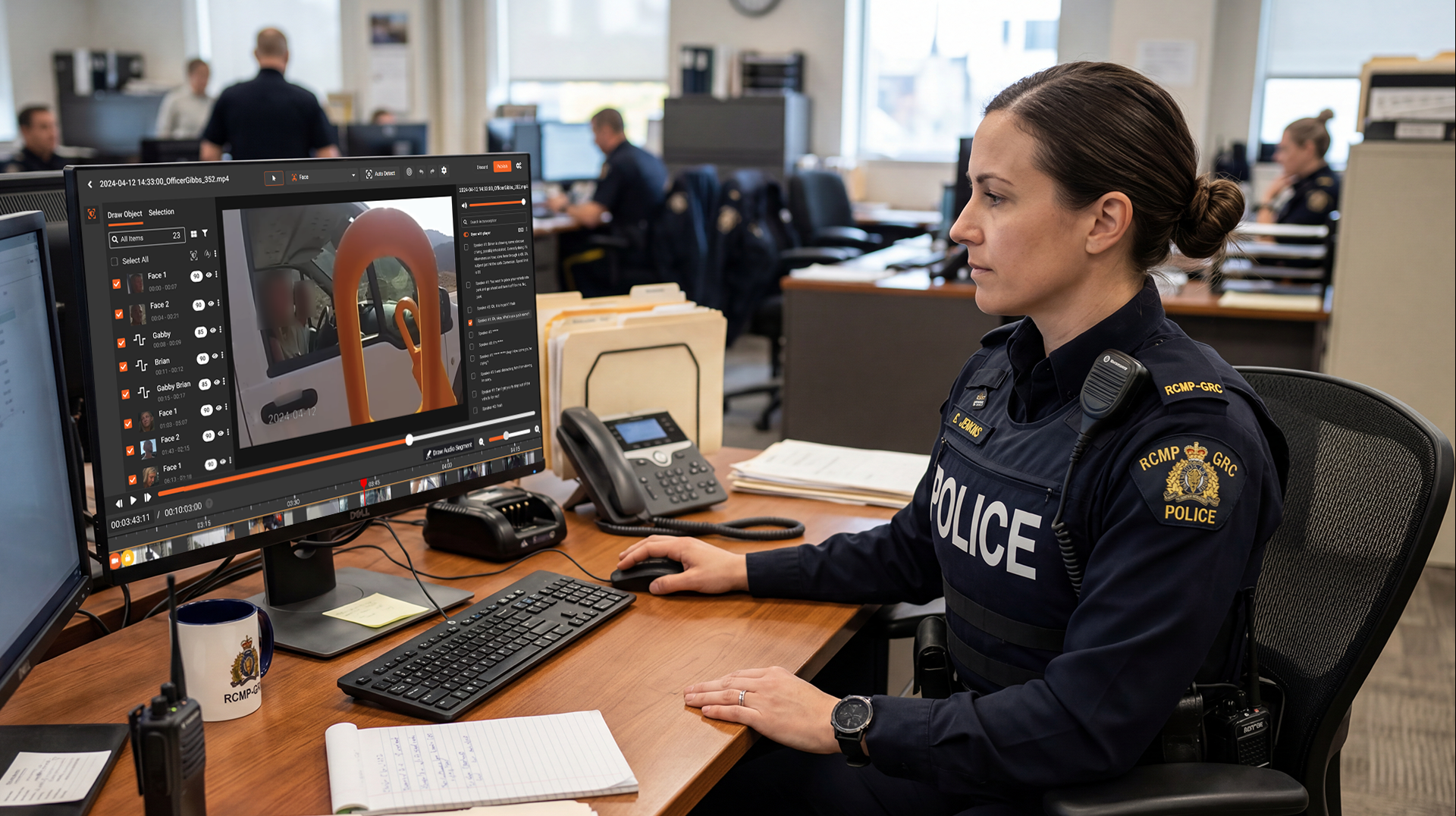
Redaction backlogs rarely come from the act of redacting. They come from the hunt. A detect-all, redact-selective workflow goes straight at that hunt: the software flags every possible piece of sensitive data in a file, and a person decides what actually gets covered.
That order matters. Most teams still work the other way around. A reviewer scrubs a document or combs through footage frame by frame, looking for names, faces, account numbers, and license plates, hoping not to miss one. The reviewing was never the slow part. The searching is.
This guide ranks the tools that support a detect-first, decide-second model across documents, video, and audio. We weigh them on three things: how much manual searching they remove, how much control they hand back to the reviewer, and how defensible the output is when a records request or a court challenge lands on your desk.
Key Takeaways
- The bottleneck in redaction is detection, not the redaction itself. A detect-all pass shifts reviewers from hunting to confirming.
- "Selective" is the safety valve. Over-inclusive AI detection plus a human approve/reject step keeps accuracy high and the work auditable.
- Format coverage is the single biggest differentiator. Most tools handle one media type well; few handle video, audio, images, and documents in one workflow.
- For high-volume FOIA and discovery teams, deployment flexibility and audit trails matter as much as raw detection accuracy.
- No tool should redact unattended on sensitive records. Treat full automation as a draft, not a final answer.
What Is a Detect-All, Redact-Selective Workflow?
It's a two-stage redaction process. An AI model first detects every candidate piece of sensitive data across a file, then a human reviewer selectively approves, edits, or rejects each suggested redaction before export. The goal is simple: remove the manual search step while keeping a person accountable for the final call.
Think of it as inverting the default. Traditional manual redaction asks one person to both find and fix every item, with no second set of eyes on what they missed. The detect-all model splits those jobs. The machine handles recall, casting a wide net so nothing slips through. The human handles precision, deciding what is genuinely exempt or sensitive.
This is why "selective" isn't a limitation. It's the control that makes detect-all safe. A detection pass that surfaces 40 candidates when only 25 need covering is far less dangerous than one that misses 3. A reviewer can reject a false positive in a single click. They cannot fix what was never flagged in the first place.
Why Do Review Backlogs Grow Under Manual Redaction?
Backlogs grow because manual redaction doesn't scale with volume, and volume keeps climbing. Every new body camera, call recording, or scanned case file adds review hours that no amount of staffing fully absorbs.
The math is unforgiving. Manual redaction of a single hour of body-worn camera footage can take four to eight analyst hours when faces, screens, and bystanders all need tracking across frames. A records clerk handling 200 requests a month is reading every page line by line. From what we have seen, the search-and-find phase eats 60 to 80 percent of that time. Almost none of it is the actual redacting.
Compliance clocks make it worse. Agencies face statutory FOIA response windows, and 5 U.S.C. 552(b) governs the exemptions a reviewer must apply to each release. Miss those windows and the legal and reputational cost is real. As open-records demands and privacy rules like HIPAA's Technical Safeguards (45 CFR 164.312) drew tighter scrutiny through 2025 and into 2026, the gap between incoming volume and review capacity stopped being a seasonal spike. It became a standing budget problem.
A common mistake is throwing fully automated redaction at this and trusting the output. The NIST guide to protecting PII (SP 800-122) is clear that sensitive-data handling needs accountable controls, not a black box. Detect-all, redact-selective keeps the human in the loop without making them do the searching.
How Do You Evaluate a Detect-All, Redact-Selective Tool?
Before ranking anything, set the criteria. We score tools on five dimensions that decide how much review burden actually disappears in practice.
- Detection coverage (recall): Does the AI flag faces, plates, screens, spoken PII, and text patterns across the whole file, or only some of them? Missed items push work back onto the human.
- Selective review experience: How fast can a reviewer confirm, edit, or reject suggestions in bulk? A clumsy approve/reject screen cancels out the detection gains.
- Format breadth: Video, audio, images, PDFs, and Office documents in one workflow, or separate tools per media type? Mixed evidence sets punish single-format tools.
- Defensibility and audit trail: Is every redaction decision logged with who, what, and when? Records and legal teams live or die on this.
- Deployment and scale: Cloud, on-premises, or hybrid, and can it batch-process overnight rather than one file at a time?
One thing worth flagging: a tool can score high on detection and still create review burden if its confirmation step drags. Recall and review experience have to be judged together, never separately.
1. VIDIZMO Redactor: Best for Multi-Format Detect-All at Scale
VIDIZMO Redactor is the strongest fit when sensitive data spans more than one media type and volume is the core problem. It runs AI detection across video, audio, images, and documents, then surfaces suggestions for a reviewer to confirm or override.
Strengths:
- Detects across 255+ formats in a single workflow, including video objects (faces, plates, screens), 33+ categories of spoken PII in audio, and text PII in PDFs and Office files.
- Configurable confidence thresholds (25%-90%) let teams tune how wide the detection net casts, which is the heart of detect-all.
- Fully automated, semi-automated, and manual modes, so reviewers can run unattended overnight batches and confirm in the morning.
- Audit trails and FOIA exemption codes (mapped to 5 U.S.C. 552(b)) make every decision defensible.
- Deploys as SaaS, government cloud, on-premises, or hybrid.
Weaknesses: The breadth means a steeper initial configuration than a single-format point tool. Teams redacting only one document type may not use the full platform.
Best for: FOIA offices, law enforcement, and compliance teams with mixed evidence and high throughput needs.
2. CaseGuard: Strong Video Detection for Desktop Workflows
CaseGuard is a capable video-redaction tool with solid automatic object detection and manual drawing controls, popular with smaller agencies.
Strengths:
- Reliable automatic face and license-plate detection with frame-to-frame tracking.
- Granular manual tools for cases where the operator wants full control.
- Approachable for teams new to AI redaction.
- Handles audio transcription and bleeping alongside video.
Weaknesses: It is primarily a desktop, file-by-file workflow, which limits unattended bulk processing. Document and OCR redaction are not its center of gravity.
Best for: Agencies whose volume is mostly video and who prefer an operator-driven desktop tool.
3. Veritone Redact: Cloud Video Redaction Inside an Evidence Stack
Veritone Redact is a cloud-based video redaction product that fits agencies already standardized on a connected evidence ecosystem.
Strengths:
- Automatic detection and tracking of faces and identifying objects in video.
- Cloud delivery removes local hardware setup.
- Integrates with broader digital-evidence platforms.
Weaknesses: It is cloud-only, which can be a constraint for agencies with data-residency or air-gapped requirements. Document and image redaction breadth is narrower than a multi-format platform.
Best for: Mid-to-large agencies committed to cloud and focused on video evidence.
4. Axon Redaction Assistant: Tight Fit for Axon-Centric Agencies
Axon's redaction tooling works best for departments already running on Axon evidence and body camera hardware, where the workflow stays inside one ecosystem.
Strengths:
- Automatic detection of faces and screens in body camera footage.
- Deep integration with Axon evidence management, so files do not leave the system.
- Familiar interface for existing Axon users.
Weaknesses: It is cloud-only and oriented around the Axon ecosystem, which limits flexibility for agencies with mixed vendors or document-heavy work.
Best for: Police departments standardized end-to-end on Axon.
5. Objective Redact: Precise Detection for Document-Heavy Teams
Objective Redact focuses on accurate text-pattern detection in documents and is well regarded by legal and corporate teams handling large paper-based sets.
Strengths:
- Strong pattern and keyword detection across long document sets.
- Built for defensibility in legal and discovery contexts.
- Fast review of repetitive text PII at scale.
Weaknesses: It is document-only. Video, audio, and image redaction sit outside its scope, so mixed-media matters need a second tool.
Best for: Legal departments and eDiscovery teams working almost entirely in text and PDFs.
6. GovQA: Records-Request Workflow With Light Redaction
GovQA is a public-records request management platform with redaction built into a broader FOIA case-handling workflow.
Strengths:
- Manages the full records request lifecycle, not just redaction.
- Familiar to government records teams.
- Keeps request tracking and disclosure in one place.
Weaknesses: Its redaction leans toward document text and is lighter on AI visual detection for video and images. High-volume multimedia redaction is not its strength.
Best for: Government records offices that want request management and document redaction together.
If your evidence mix already spans video, audio, and documents, it is worth testing a detect-all workflow against your own backlog before committing.
Comparison Table: Workflow Tools at a Glance
| Tool | Detect-All Coverage | Selective Review UX | Formats | Deployment | Best For |
|---|---|---|---|---|---|
| VIDIZMO Redactor | Video, audio, image, document | Bulk approve/reject, confidence tuning | 255+ | SaaS, Gov Cloud, On-Prem, Hybrid | Multi-format, high volume |
| CaseGuard | Video, audio | Operator-driven | Video + audio | Desktop | Video-first small teams |
| Veritone Redact | Video | Cloud review | Video-centric | Cloud-only | Cloud video evidence |
| Axon Redaction Assistant | Video | In-ecosystem review | Video-centric | Cloud-only | Axon-standardized agencies |
| Objective Redact | Document text | Fast text confirm | Documents | Cloud / desktop | Legal and eDiscovery |
| GovQA | Document text | Request-linked review | Documents | Cloud | Records request offices |
Pricing models vary widely across these tools. Request a quote from each vendor and weigh total cost against the analyst hours the workflow saves, not the license fee alone.
How to Choose the Right Workflow for Your Team
Start with your evidence mix, not the feature list. If 90 percent of what you redact is one media type, a focused tool may serve you well. A legal team buried in PDFs gets real value from Objective Redact's text precision. A small department with only body camera footage may be fine with CaseGuard's desktop video tools.
The calculus changes the moment your queue goes mixed. In our work with agencies, the hidden cost is rarely any single tool's accuracy. It's the handoff between tools, the duplicate exports, and the second audit trail you have to reconcile. When video, audio, and documents all land in the same FOIA request, a single multi-format platform like VIDIZMO Redactor removes that friction and keeps one defensible record of every decision.
Finally, weigh deployment against your compliance posture. Cloud-only tools are fine for many commercial teams. But agencies that need CJIS-compliant deployments, data-residency control, or air-gapped operation require on-premises or government-cloud options, and that one constraint narrows the field fast. For most teams under heavy volume, our honest take is that format breadth plus a fast selective-review step beats a marginally more accurate single-format detector every time.
Frequently Asked Questions
What is a detect-all, redact-selective workflow?
It's a two-step process where AI first detects every candidate piece of sensitive data in a file, then a human reviewer selectively approves or rejects each suggested redaction before export. The model handles the searching. The person handles the final decision. That removes the manual hunt while keeping accountability with a human.
What is the best redaction tool?
There is no single best tool. The right choice depends on your media mix, volume, and compliance needs. Document-only teams often prefer text-focused tools, while agencies with mixed video, audio, and document evidence get more value from a multi-format platform like VIDIZMO Redactor. Match the tool to your evidence types and deployment requirements first.
How can you be sure of the redaction?
Certainty comes from combining over-inclusive AI detection with a human confirmation step and a full audit trail. The detect-all pass minimizes missed items, the selective review catches false positives, and the logged record shows who approved each decision. Always preview the redacted output and confirm the redaction is burned into the exported file, not just a removable overlay.
When redacting documents, what is best practice?
Best practice is to apply true redaction that permanently removes the underlying data, never just a black box drawn over visible text. Map each redaction to an exemption code (for FOIA, the categories in 5 U.S.C. 552(b)), keep an audit log of decisions, and run a second review on a sample before release. Don't edit the original. Work from a redaction copy that preserves the source.
What software would you use for redacting confidential information?
Use purpose-built redaction software with AI detection, configurable confidence thresholds, and audit logging rather than a generic PDF editor. For confidential information spread across video, audio, and documents, a multi-format platform such as VIDIZMO Redactor handles all media in one workflow. The features to require are permanent redaction, exemption coding, and a defensible decision trail.
How does a detect-all workflow compare to fully automated redaction?
Fully automated redaction exports without human review, which is fast but risky for sensitive records. A detect-all, redact-selective workflow keeps the speed of automated detection but adds a human approve/reject step, so accuracy and defensibility stay high. Treat full automation as a draft for low-risk batches, and reserve the selective review for anything legally consequential.
Does this workflow work for video and audio, not just documents?
Yes. Detect-all applies to faces, license plates, and screens in video, and to spoken PII like names, SSNs, and account numbers in audio. The reviewer confirms flagged regions or audio segments the same way they would confirm text in a document. Tools differ widely here, so confirm multimedia support before assuming it.
Can a detect-all workflow reduce FOIA backlogs?
It can, often substantially, because the search phase that consumes most review time is automated. Reviewers shift from finding sensitive data to confirming flagged candidates, which is far faster at scale. Combined with bulk overnight processing, agencies can clear records requests within statutory windows that manual review routinely misses.
If your team is drowning in mixed-media records requests, see how a detect-all, redact-selective workflow holds up against your real backlog. Talk to a redaction specialist about your volume and compliance needs.
TopicsData SecurityRedaction

About the author
Ali Rind is a Product Marketing Executive at VIDIZMO, where he focuses on digital evidence management, AI redaction, and enterprise video technology. He closely follows how law enforcement agencies, public safety organizations, and government bodies manage and act on video evidence, translating those insights into clear, practical content. Ali writes across Digital Evidence Management System, Redactor, and Intelligence Hub products, covering everything from compliance challenges to real-world deployment across federal, state, and commercial markets.
You may also like

What Privacy Laws Require You to Redact From AI Training Data
The data you train an AI on is regulated the same way as any other copy of that data. If it holds personal information, ...
How to Redact Your Data Before Training or Customizing AI
Using your own data to train or customize an AI is different from feeding a document into a chatbot. When you train, ...
EOB and Claim Form Redaction: A Practical Guide for Billing Teams
Generic PHI redaction guidance does not account for the way billing documents are structured. EOBs often bundle ...
See it on your own content
Tell us what you are trying to solve and we will show you how it works on your infrastructure.