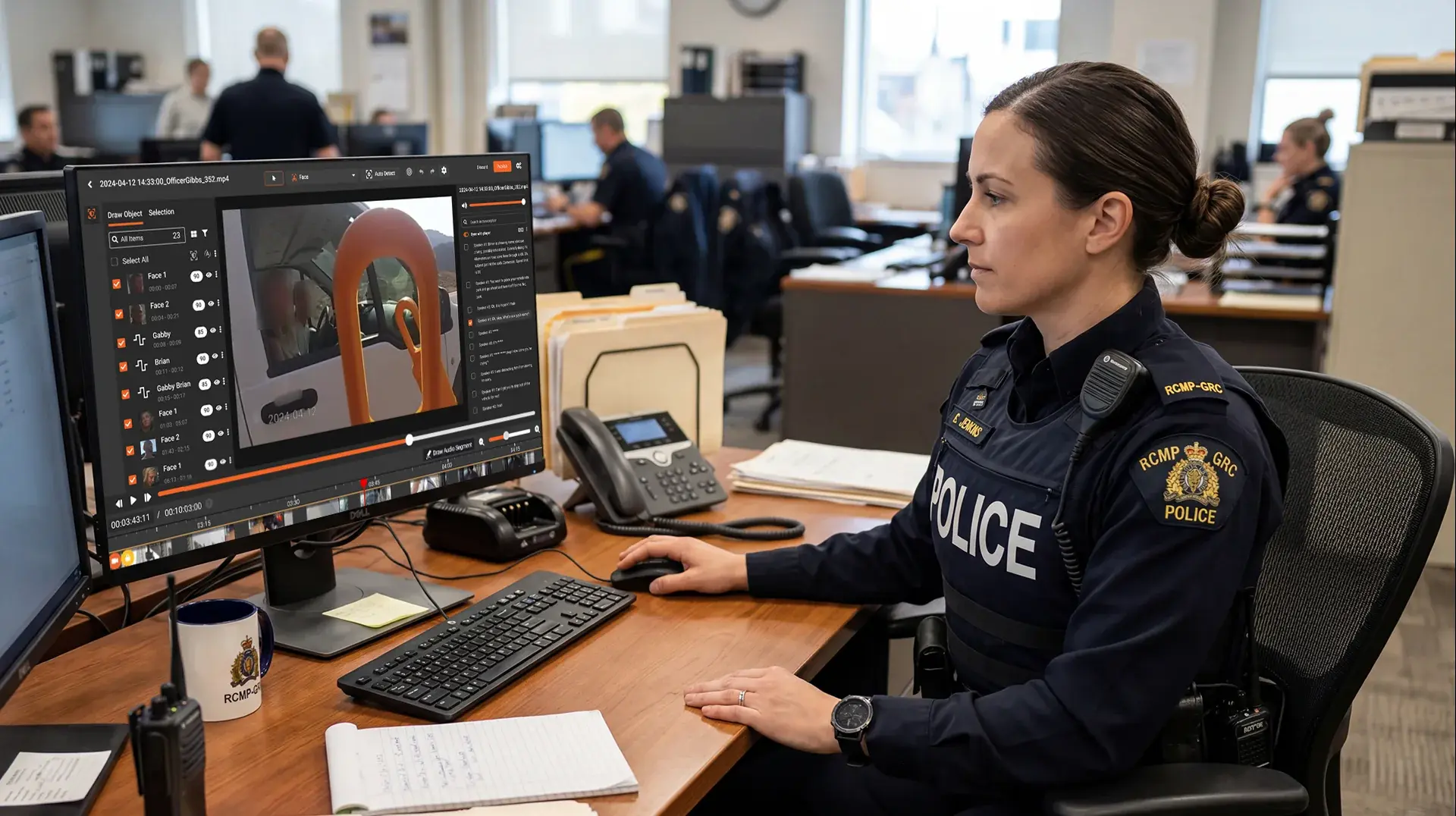
A vehicle strikes pedestrians at a public event. Officers respond, and within minutes their body cameras have captured hundreds of faces: victims, witnesses, people filming on their phones, and somewhere in the middle of it, the suspect. Then the records requests start arriving. Local news wants the footage. So do attorneys, advocacy groups, and residents filing open records requests.
The records team now faces a problem that most redaction tools were never designed to solve. They cannot release the footage with every face blurred, because the suspect must remain identifiable. They cannot release it with no faces blurred, because every bystander in that crowd has a privacy interest, and some of them are minors. The job is not to blur everything. It is to blur everyone except specific people, and to hold that decision steady across hours of moving footage.
That is selective video redaction, and it is a different task than the blanket face blurring most agencies are used to.
What Is Selective Video Redaction?
Selective video redaction is the process of obscuring some individuals in video footage while deliberately keeping others visible. In police video, this usually means blurring bystanders, witnesses, and minors while retaining the faces of suspects whose identity carries evidentiary or public-interest value. AI detects every face, a reviewer marks which ones to retain, and blur is applied to everyone else.
The distinction matters because blanket redaction and selective redaction fail in opposite ways. Blanket redaction over-protects: the released video shows a scene full of blurred heads, and the footage loses its meaning as a public record. Selective redaction has to make judgment calls, and those calls need a workflow that can express them.
Why Police Can't Blur Every Face in Evidence Video
A suspect's blurred face can undermine the entire reason footage gets released. Courts, prosecutors, and the public need to see who did what. Under FOIA Exemption 7(C), privacy protections apply to individuals whose identification serves no public interest, but the conduct of a suspect in a documented incident is often exactly what the public interest covers. State open records laws draw similar lines, and several states spell out who must be protected and who may remain visible, which we cover in our guide to body worn camera redaction laws and privacy requirements.
The reverse error is just as costly. A bystander's face left visible in released footage is a privacy violation the agency cannot take back. Once footage goes out under an open records request, the requester can post it anywhere, and the department carries the blame for whatever identification follows. Agencies have settled lawsuits over exactly this kind of failure.
So the records analyst sits between two liabilities. Blur the wrong face and the evidence loses value. Miss the wrong face and someone's privacy is gone. With more than half of US law enforcement agencies now using body-worn cameras, the volume of footage carrying this dual obligation keeps growing.
How Selective Redaction Works: From Detection to Release
The workflow runs in four stages.
1. AI detects every face in the footage
The detection pass makes no judgment about who anyone is. It finds faces, assigns each one a tracking ID, and follows them through the scene. Configurable confidence thresholds let the agency tune how aggressively the AI flags possible faces in fast motion or poor lighting.
2. A reviewer marks retained individuals
The analyst opens the detections and marks the suspect, and any other individuals cleared for release, as retained. Everyone else stays in the default blur set. This single decision replaces what manual workflows handle face by face, frame by frame.
3. Blur applies to everyone except the retained set
Auto-tracking carries each decision through the footage. When the suspect walks behind a parked car and reappears, the retain flag holds. When a bystander turns away and back, the blur holds. A separate detection class flags content that needs redaction regardless of identity, such as nudity or other inappropriate material captured during the incident.
4. A reviewer approves before release
The output is a redacted copy. The original file stays untouched, which preserves chain of custody and keeps the unredacted evidence intact for court. Our walkthrough of how to redact body cam footage for FOIA requests covers the full request-to-release process around this step.
For agencies handling incident surges, where one event can generate twenty requests in a month, the same retain rules can run across a whole batch through bulk redaction rather than one file at a time.
Keeping One Person Consistent Across Multiple Cameras
A single incident rarely produces a single video. The hit-and-run scenario above might generate footage from four body cameras, two dashcams, and a nearby business's CCTV. The suspect appears in all of them. So do many of the same bystanders.
Inconsistency across angles is where manual selective redaction breaks down. If the suspect is visible in the bodycam release but blurred in the dashcam release, the inconsistency invites challenge. If a bystander is blurred in three videos and visible in the fourth, the privacy protection in the first three accomplished nothing. The fourth video identifies them anyway.
Treating the incident as one redaction project, with one set of retain decisions applied across every file, is the only way to keep the releases coherent. It also gives the agency one audit trail instead of seven.
Why Human Review Matters More in Selective Redaction
Fully automated redaction works when the rule is simple: blur all faces, mute all spoken names. Selective redaction has no simple rule. Deciding who counts as a suspect versus a witness is a legal judgment tied to the specific request, and that judgment belongs to a person.
AI detection also misses things, and in selective redaction both error directions carry real consequences. A wrongly blurred suspect compromises the evidentiary value of the release. A wrongly visible bystander creates the privacy exposure the redaction existed to prevent. Reflections, partial faces, and brief tracking drops are the usual culprits; we documented several of these in our review of real redaction failures and how to prevent them.
The practical answer is a human-in-the-loop process: AI does the detection and tracking, the analyst makes the retain decisions, and a reviewer signs off before anything leaves the building. Every decision gets logged, so the agency can defend the release if it is ever challenged.
How VIDIZMO Redactor Handles Selective Redaction
VIDIZMO Redactor was built around the assumption that not every detection should be treated the same way. AI detects faces, people, license plates, and custom objects, and the redaction studio lets analysts mark specific individuals to retain while blur applies to the rest. Auto-tracking holds those decisions through movement, and confidence thresholds are adjustable per detection class.
Originals are never replaced. Redacted output is generated as a separate copy with a full audit trail, and approval workflows keep a reviewer between the AI and the release. Agencies can run it in Azure Government cloud or on their own servers, a decision we compare in on-premises vs. cloud redaction for law enforcement IT. For the broader feature picture, see our video redaction software guide.
Try it on your own footage. Start a free trial and see how retain decisions hold across a full incident's video in one pass.

FAQ
Frequently Asked Questions
What is a detect-all, redact-selective workflow?
It's a two-step process where AI first detects every candidate piece of sensitive data in a file, then a human reviewer selectively approves or rejects each suggested redaction before export. The model handles the searching. The person handles the final decision. That removes the manual hunt while keeping accountability with a human.
What is the best redaction tool?
There is no single best tool. The right choice depends on your media mix, volume, and compliance needs. Document-only teams often prefer text-focused tools, while agencies with mixed video, audio, and document evidence get more value from a multi-format platform like VIDIZMO Redactor. Match the tool to your evidence types and deployment requirements first.
How can you be sure of the redaction?
Certainty comes from combining over-inclusive AI detection with a human confirmation step and a full audit trail. The detect-all pass minimizes missed items, the selective review catches false positives, and the logged record shows who approved each decision. Always preview the redacted output and confirm the redaction is burned into the exported file, not just a removable overlay.
When redacting documents, what is best practice?
Best practice is to apply true redaction that permanently removes the underlying data, never just a black box drawn over visible text. Map each redaction to an exemption code (for FOIA, the categories in 5 U.S.C. 552(b)), keep an audit log of decisions, and run a second review on a sample before release. Don't edit the original. Work from a redaction copy that preserves the source.
What software would you use for redacting confidential information?
Use purpose-built redaction software with AI detection, configurable confidence thresholds, and audit logging rather than a generic PDF editor. For confidential information spread across video, audio, and documents, a multi-format platform such as VIDIZMO Redactor handles all media in one workflow. The features to require are permanent redaction, exemption coding, and a defensible decision trail.
How does a detect-all workflow compare to fully automated redaction?
Fully automated redaction exports without human review, which is fast but risky for sensitive records. A detect-all, redact-selective workflow keeps the speed of automated detection but adds a human approve/reject step, so accuracy and defensibility stay high. Treat full automation as a draft for low-risk batches, and reserve the selective review for anything legally consequential.
Does this workflow work for video and audio, not just documents?
Yes. Detect-all applies to faces, license plates, and screens in video, and to spoken PII like names, SSNs, and account numbers in audio. The reviewer confirms flagged regions or audio segments the same way they would confirm text in a document. Tools differ widely here, so confirm multimedia support before assuming it.
Can a detect-all workflow reduce FOIA backlogs?
It can, often substantially, because the search phase that consumes most review time is automated. Reviewers shift from finding sensitive data to confirming flagged candidates, which is far faster at scale. Combined with bulk overnight processing, agencies can clear records requests within statutory windows that manual review routinely misses.
If your team is drowning in mixed-media records requests, see how a detect-all, redact-selective workflow holds up against your real backlog. Talk to a redaction specialist about your volume and compliance needs.
TopicsData SecurityRedaction

About the author
Ali Rind is a Product Marketing Executive at VIDIZMO, where he focuses on digital evidence management, AI redaction, and enterprise video technology. He closely follows how law enforcement agencies, public safety organizations, and government bodies manage and act on video evidence, translating those insights into clear, practical content. Ali writes across Digital Evidence Management System, Redactor, and Intelligence Hub products, covering everything from compliance challenges to real-world deployment across federal, state, and commercial markets.
You may also like
Video Redaction Best Practices: Motion, Frame Rates, Tracking and Failing Safe
I led our video redaction project for a county public safety agency where two people handled every disclosure, and ...
Redacting Dash Cam, Body Cam and Drone Footage From a Moving Camera
A fleet claims manager preparing crash footage for an insurer and defense counsel is doing a different job from a ...
Why Frame-Rate Headers Lie: Redacting Variable Frame Rate Video
A video file keeps time frame by frame, and the frames-per-second figure a player displays is a summary of that timing, ...