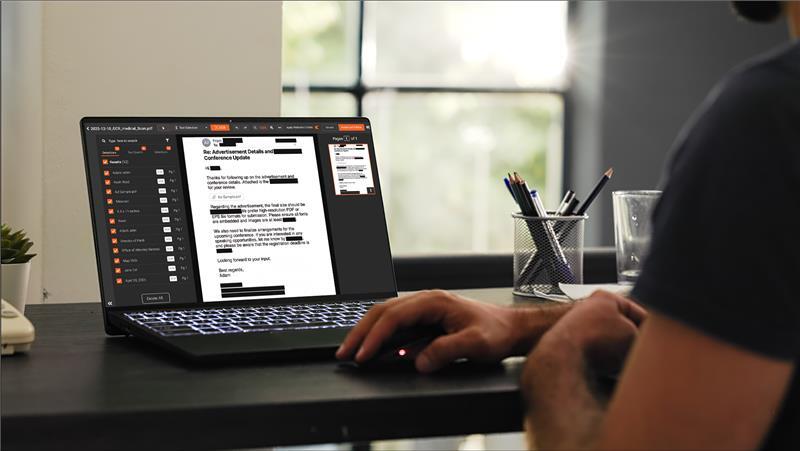
Most people who search for how to redact an email are trying to solve one of two problems. The first is a one-off: a single message that needs a few names or account numbers removed before being forwarded to a third party. The second is recurring: a compliance or discovery workload where many emails need consistent redaction at volume. The right method depends on which problem you actually have, and the answers diverge fast.
This guide covers the three methods practical for email redaction, the step-by-step workflow that runs the same regardless of method, the considerations for scanned letters and mailed correspondence, the attachment problem, and the threshold at which AI redaction software pays off. Outlook-specific behavior (recall, sensitivity labels, edit-after-send) is covered in a separate post; see redacting emails in Outlook. For thread anatomy and regulatory framing, see the email redaction use case, and for tool evaluation criteria, the PII redaction software guide.
What Email Redaction Actually Means
Email redaction is the permanent removal of specific content from an email file (and its attachments) so that the sensitive information no longer exists in the version that gets shared.
This is different from masking, which displays a placeholder while the underlying value still exists in the system, and different from access control, which restricts who can see the message but does not modify its content. Redaction is a content transformation. The redacted file should not contain the original sensitive content in any layer (text, metadata, embedded image, tracked changes, comment).
Three Ways to Redact an Email, Compared
Manual black-boxing in a PDF editor
Export the email to PDF, open in Acrobat or a similar tool, use the dedicated redaction tool (not markup or annotation) to remove the sensitive content, save the redacted output. This works for a single email with low PII density and no scanned attachments. It does not scale. The reviewer has to find every instance manually, the audit trail is whatever the PDF tool produces (typically minimal), and consistency degrades as the workload grows. The mistake people most often make in this method is using markup or annotation in place of the dedicated redaction tool, which leaves the underlying text recoverable. The American Bar Association has documented court filings defeated exactly this way, where black boxes drawn over searchable text were exposed with copy and paste.
When this is acceptable: a one-off message, one or two PII items, no audit requirement, no compliance scrutiny. When it is not: any recurring volume, any document with scanned attachments, any release that may be challenged later.
Generic PDF editors with pattern detection
Acrobat Pro and similar tools offer pattern detection for the common North American identifiers (Social Security numbers, phone numbers, email addresses, credit card numbers). Detection runs across native PDF text and surfaces matches for review. This is a step up from pure manual marking, and for native-text PDFs with limited PII variety, it can handle modest volume.
The limits show up at scale. Generic PDF editors do not handle video or audio attachments, do not detect content inside embedded images without separate OCR steps, do not produce an audit log suitable for compliance defensibility, and do not support per-matter rule configurations. Pattern coverage is limited to common North American identifiers; UK National Insurance numbers, India's Aadhaar, custom organization identifiers, and other categories require manual marking.
When this is acceptable: small teams with predictable volume, low PII variety, no audit scrutiny, no mixed media. When it is not: enterprise-scale work, regulated industries, multi-format productions, anything that may be challenged on appeal.
AI redaction software
Purpose-built redaction platforms run AI detection across documents (including attachments), audio, and video, with OCR for scanned content and ICR for handwriting. The reviewer confirms detections and applies judgment on edge cases. The platform produces an audit log of every redaction action, and the redacted output is permanent content removal rather than visual overlay. Multi-format productions (where the email has scanned letter attachments, a recorded voicemail, or an attached image) run through one workflow rather than three.
When this is the right method: enterprise compliance work, regulated industries, multi-format productions, recurring workloads, anything that will be audited or challenged.
How to Redact an Email Step by Step
The operational steps are the same regardless of which method handles the redaction.
Export the email from the mail client. For Outlook, this means Save As PDF or Print to PDF. For Gmail, the print dialog includes a Save as PDF option. For threaded conversations, export the full thread rather than the most recent message. If attachments need to travel with the redacted message, save them alongside in their original format.
Detect the sensitive content. For manual work, this is the reviewer scanning the document visually. For pattern-based tools, this is the tool's pattern detection running across the text layer. For AI software, this is multi-format detection covering documents, OCR'd scanned content, audio, and video in a single pass.
Review and approve. Even fully automated tools produce a list of detections rather than a final output. The reviewer confirms catches, overrides false positives, and applies judgment on edge cases. This step is what makes the redaction defensible if challenged later.
Produce the output. Permanent content removal in the redacted file, not visual overlay. The original email stays in the mailbox under normal access controls. The redacted output is the artifact delivered to the requesting party.
Log the action. For compliance-defensible work, every redaction action is logged with operator, timestamp, and basis. The audit log accompanies the response file or stays in tamper-proof storage as the defensibility record.
Redacting Scanned Letters and Mailed Correspondence
Postal mail and scanned letters routinely arrive as part of email workflows. A scan of a signed contract attached to a transmittal email. A photographed receipt forwarded for expense processing. A fax-converted scan landing in a shared inbox. These files contain text only as image pixels and cannot be redacted through text-based tools.
OCR (optical character recognition) is the bridge. The redaction tool runs OCR across the scanned content to extract the text, runs detection across the extracted text, and applies redaction at the pixel level of the source image. Handwritten content requires ICR (intelligent character recognition), which is a separate capability from OCR. Tools without ICR cannot reliably redact handwritten notes on intake forms, signed contract margins, or handwritten correspondence.
For a scanned letter, the practical workflow is the same as for any document: ingest, run OCR (and ICR where needed), detect the PII, review, redact, output. The output is a redacted PDF with the original text content removed where the detection identified sensitive material. The unredacted scan is preserved in restricted storage.
How to Redact Email Attachments
Email attachments often carry the bulk of the sensitive content. A short cover message with a 30-page contract attached. A one-line forward with a spreadsheet of customer accounts. A reply with a scanned PHI form attached. Redacting the email body without addressing the attachments leaves most of the exposure intact.
The practical pattern: treat the email and each attachment as separate redaction items in the same workflow. Export the email to PDF, save each attachment in its original format, ingest all of them as a related set into the redaction tool, and produce a redacted output for each. The reviewer signs off on the full set before delivery. For multi-format attachments (a PDF, a Word file, a video, an audio recording all attached to one email), a single redaction platform that handles all formats removes the assembly overhead of using separate tools per format.
For deeper detail on attachment handling and thread-level redaction, see the email redaction use case.
When Email Redaction Software Pays Off
The threshold sits somewhere around moderate recurring volume or any meaningful compliance scrutiny.
Under ten redactions a month with no scanned attachments and no audio or video involved, manual methods are workable if the reviewer is meticulous. The audit gap is real but may be acceptable for low-stakes work.
Above ten a month, or with mixed-format productions, or with any regulator or audit scrutiny, the math shifts. Careful manual review across a fifty-email batch with attachments is hours of work that AI-assisted detection and reviewer approval can compress to a fraction, and the audit log is automatic rather than reconstructed from memory.
If your redaction workload has outgrown black boxes, contact us to see what AI detection catches that manual review misses. Upload an email thread with attachments and judge the output yourself.

FAQ
Frequently Asked Questions
What's the easiest way to redact an email?
For a single email with one or two items to remove, export to PDF and use a PDF editor's dedicated redaction tool, never markup or comments, which leave the underlying text recoverable. For recurring work or emails with scanned or mixed-format attachments, dedicated redaction software handles the full export-and-redact workflow with permanent removal and an audit log.
Can you redact an email for free?
Sometimes, for a one-off. Free PDF tools can produce a genuinely redacted output only if they include a true redaction feature that removes underlying text. Most free tools offer markup or annotation instead, which looks redacted while leaving the text recoverable. For anything recurring or auditable, dedicated software is the practical choice.
How do you redact an email thread?
Export the full thread to PDF, not just the latest message, so every header, body, signature, and quoted reply is included. Run the exported PDF through a redaction tool with permanent content removal, review the flagged detections, and produce a single redacted PDF of the entire conversation.
Can scanned letters be redacted?
Yes, with a tool that includes OCR. Scanned letters store text as image pixels, which text-based tools cannot find. OCR extracts the text, detection runs across it, and redaction is applied at the pixel level of the source image. Handwritten content additionally requires ICR.
What is the difference between redacting and masking an email?
Redaction permanently removes the sensitive content from the shared file; it cannot be recovered. Masking displays a placeholder while the original value still exists in the underlying system. Masked data can be unmasked by anyone with system access; redacted data is gone from the output entirely.Share
TopicsRedactionDocument Redaction

About the author
Ali Rind is a Product Marketing Executive at VIDIZMO, where he focuses on digital evidence management, AI redaction, and enterprise video technology. He closely follows how law enforcement agencies, public safety organizations, and government bodies manage and act on video evidence, translating those insights into clear, practical content. Ali writes across Digital Evidence Management System, Redactor, and Intelligence Hub products, covering everything from compliance challenges to real-world deployment across federal, state, and commercial markets.
You may also like

Video Redaction Best Practices: Motion, Frame Rates, Tracking and Failing Safe
I led our video redaction project for a county public safety agency where two people handled every disclosure, and ...

Redacting Dash Cam, Body Cam and Drone Footage From a Moving Camera
A fleet claims manager preparing crash footage for an insurer and defense counsel is doing a different job from a ...

Why Frame-Rate Headers Lie: Redacting Variable Frame Rate Video
A video file keeps time frame by frame, and the frames-per-second figure a player displays is a summary of that timing, ...